Quick Answer
Whether you need a VPS depends on what your EA does while disconnected, not on how often your PC goes offline. A single H1 trend EA with stop-loss and take-profit already resting on the broker’s server only loses new-signal detection when the terminal stops, so a VPS is a convenience; a grid or actively-managed EA evaluates its own drawdown protections inside the terminal, so those protections do nothing while disconnected and a VPS becomes close to a requirement. Latency is a separate question: proximity hosting cuts round trips to single-digit milliseconds, which matters for scalping and news trading and is noise for an EA acting on completed hourly bars. A paid forex VPS at the 2-core, 2GB recommended spec typically runs $10–30 a month, and the free routes carry conditions — XM’s free VPS requires a $5,000 balance or 5 standard lots of monthly volume (as published by XM, July 2026), and Oracle’s always-free tier runs MT4 only through an unsupported emulation layer.
Pitfall: Assuming Your Home PC Behaves Like a Server
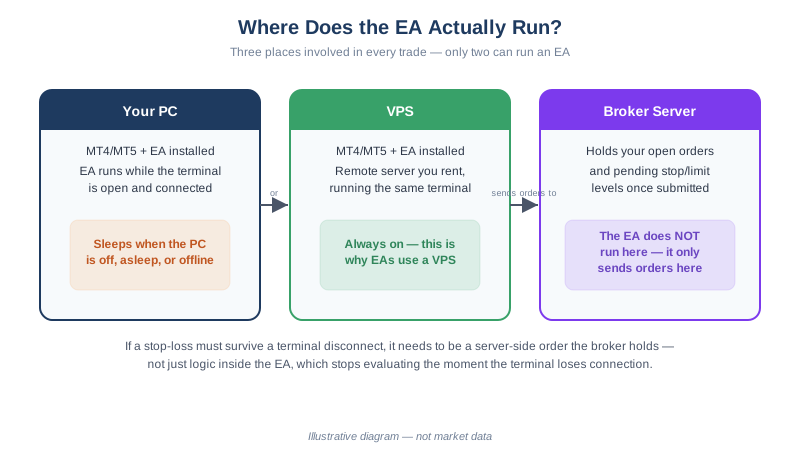
A forex Expert Advisor runs inside your terminal, not on the broker’s server. That single fact is the root of every failure mode in this guide: when the terminal stops, the EA stops managing your open positions — though any stop-loss or take-profit already placed with the broker stays live, because those orders sit on the broker’s side, not yours.
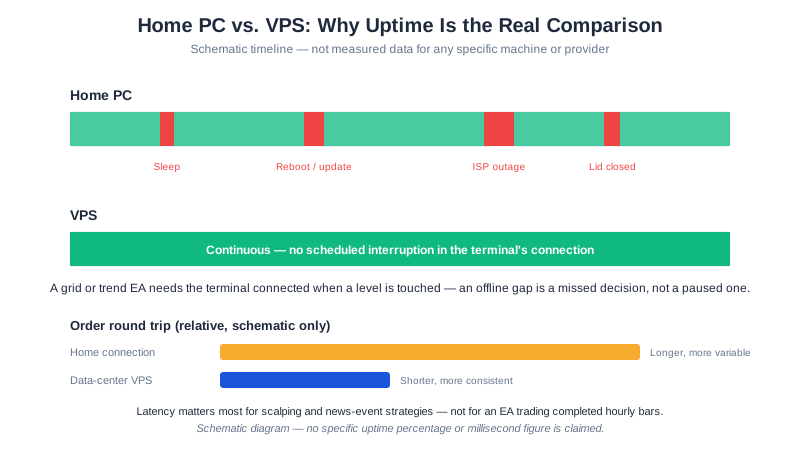
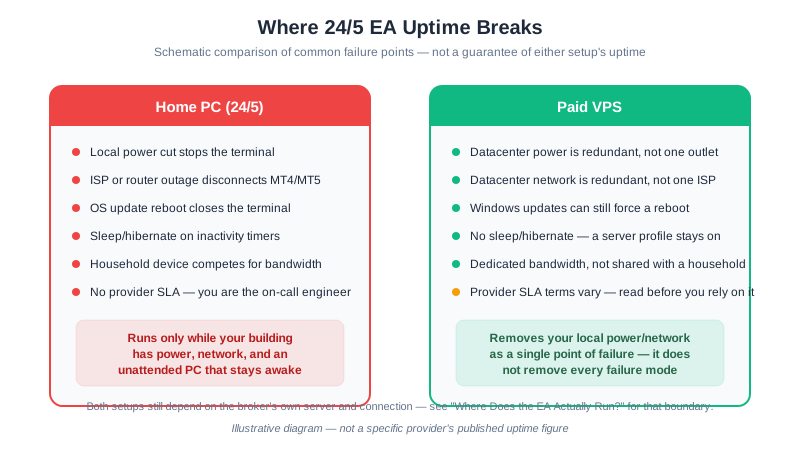
A home PC is built to sleep, update, and reboot without asking you. Each of those is invisible to the EA until it has already stopped reacting:
- Sleep and screen-lock. Most laptops suspend after inactivity by default; a suspended machine doesn’t run MetaTrader, it pauses it.
- Scheduled OS updates. Windows Update reboots on its own schedule unless you’ve disabled it, closing every open application including MT4/MT5.
- Wi-Fi drops that don’t show an alert. A router restart or ISP hiccup can disconnect the terminal from the broker with no popup forcing your attention — the chart keeps rendering old prices as if nothing happened.
- Closing the lid. Treated by most laptops as a sleep trigger, not a background-continue signal, even when “plugged in” settings suggest otherwise.
A VPS (Virtual Private Server) exists specifically to remove this category of failure: it keeps MetaTrader running 24/7 on infrastructure that isn’t also your personal computer.
What a VPS does not fix: your strategy’s edge. A VPS improves uptime and, for latency-sensitive strategies, execution speed — it does not change expectancy. An EA with negative expectancy loses money faster with perfect uptime, not less. Treat a VPS as infrastructure that lets a sound strategy run as designed, not as a performance upgrade in itself.
When Yes, When No: Decision Table by EA Type
| Your setup | VPS need | Why |
|---|---|---|
| Single H1 trend EA, one pair, broker-side stops set | Convenience | Stops still fire if the terminal is off; you only lose new-signal detection until you reconnect |
| Multiple EAs or pairs on one account | Recommended | More positions to manage in parallel raises the cost of a missed reconnect |
| Grid or actively-managed EA (e.g. GridMaster) | Near-requirement | Drawdown protections like MaxDrawdownPercent and EquityProtectionPercent are evaluated by the EA itself — see the setup guide — and do nothing while disconnected |
The distinction is what fails, not just how often. A trend EA that misses one signal because your laptop slept for an hour costs you a trade. A grid EA that stops evaluating its own drawdown gate during the same hour, in the middle of a trending move, costs you the protection that exists specifically for that scenario.
Pitfall: Paying for Latency You Don’t Need
A VPS placed near the broker’s data center cuts round-trip order latency from the tens-to-low-hundreds of milliseconds typical of a home connection down to single digits. That matters for scalping and news-event trading, where a strategy’s edge is measured in the same units as the delay itself, and for any EA trading during high-impact releases when spreads and slippage spike in the first seconds.
For an EA trading H1 entries on trend or swing setups, this is largely irrelevant. The signal is based on a completed hourly bar; an extra 100 milliseconds of order latency is noise next to the multi-pip spread and normal slippage the trade already absorbs, and the difference between a VPS 5ms from the broker and a home connection 80ms away won’t show up in the equity curve of an EA that only checks conditions once an hour. Don’t pay more for a premium low-latency plan to make an hourly strategy faster — the speed was never the constraint. Reserve that spending for a strategy that actually holds trades in the seconds-to-minutes range.
Pitfall: Trusting a “Free VPS” Without Reading the Condition
XM Free VPS: requires a $5,000 account balance, or at least 5 standard lots of trading volume per month (as published by XM, July 2026). Worth stating plainly: 5 standard lots is a great deal of trading for a $500 account. At 0.01 lots per trade (the typical size our EAs compute at that balance — lot sizing math), reaching 5 standard lots of volume needs roughly 500 trades in a month, over 20 a day. Our own published backtests show far lower trade frequency — DualHorizon’s EURUSD test averaged under 5 trades a month. We’re an XM Introducing Broker and financially benefit when readers trade more, so we have every incentive to undersell this point — we’re not: for a conservative EA at typical position sizes, this offer is not realistically reachable.
Oracle Cloud Free Tier: an always-free ARM-based instance can run MT4 through Wine or a Windows emulation layer, at zero cost. It is also fragile — MetaQuotes does not support or test MT4 on this configuration, updates can break the setup without warning, and troubleshooting an emulation layer requires more technical skill than a native Windows VPS. Treat it as a way to learn, not as the base for a live account you depend on.
The pitfall isn’t that free options don’t exist — it’s assuming “free” means “free of the condition.” Read the qualifying terms before you build a plan around either one.
Choosing a Paid VPS Without Over- or Under-Speccing
If neither free option fits, a dedicated forex VPS from a commercial provider typically runs $10–30 a month for a specification matching the table below — modest against the cost of a missed reconnect on a grid EA. For verified current prices across several specific providers, see our cheapest forex VPS options 2026 comparison rather than treating the range above as a quote. If you are weighing that monthly fee against simply leaving your own machine on, we run the electricity arithmetic and the failure-mode comparison side by side in forex VPS vs home PC.
| Spec | Minimum | Recommended |
|---|---|---|
| CPU | 1 core | 2 cores |
| RAM | 1 GB | 2 GB |
| Storage | 20 GB SSD | 40 GB SSD |
| OS | Windows Server | Windows Server 2019+ |
| Location | Near broker server | London or New York |
Under-speccing (1 core, 1GB RAM) is a false economy once you’re running more than one EA or terminal — the plan saves a few dollars a month and costs you responsiveness exactly when the market is moving fastest. Over-speccing for a single H1 trend EA is the opposite mistake: a premium low-latency plan buys speed an hourly strategy can’t use, as covered above.
Setting Up MT4 on a VPS
- Connect via Remote Desktop (RDP)
- Install MetaTrader 4 and log in to your trading account
- Install your EA
- Enable WebRequest for EA verification
- Attach the EA to a chart and enable AutoTrading
- Disconnect from RDP rather than logging off — MT4 keeps running on disconnect; logging off can close it
Pitfall: Treating the VPS as “Set and Forget”
A VPS removes the home-PC failure modes above, but it introduces its own, and running MT4 unattended on it fails in specific, recurring ways:
- Windows auto-restart. Scheduled update reboots close MT4 with it unless auto-login and an MT4 startup shortcut are configured — the terminal does not resume itself.
- MT4 not relaunching on boot. Even with auto-login, MT4 needs to be placed in the Windows Startup folder; otherwise a reboot leaves the VPS running with no terminal open at all.
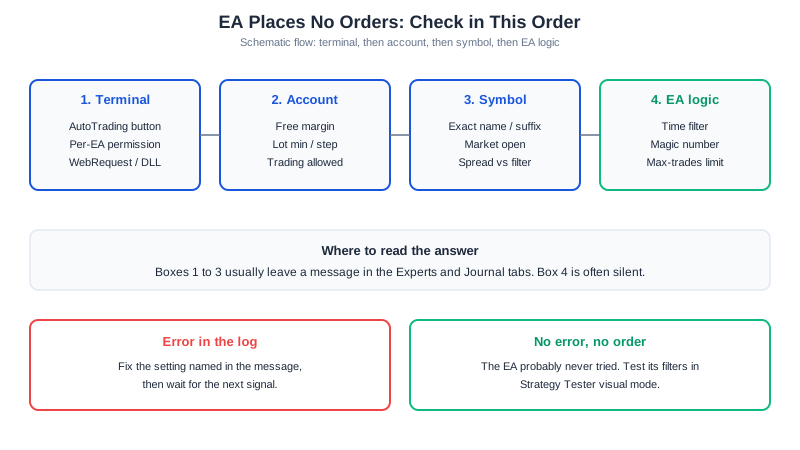
- Silent disconnects. A broker-side connectivity drop can leave the platform open but not trading, with no obvious visual alert unless you’re watching the connection icon.
- RDP session limits. Some VPS plans cap concurrent RDP sessions; a second login can force the first session (and anything tied to its visible desktop) to close.
- Local time zone confusion. A VPS’s clock and time zone rarely match yours by default; if an EA logic depends on session hours or a Friday close time, mismatched server time can trigger the wrong behavior at the wrong hour.
If the VPS itself crashes mid-trade: any stop-loss and take-profit already placed with the broker remain active and execute normally, since those orders live on the broker’s server, not the VPS. What stops is trade management logic that exists only inside the EA — trailing stops, equity-based closes, and new signal detection. That gap is exactly why monitoring, not just uptime, is the real requirement:
A concrete monitoring recipe: check the MT4 mobile app at least once daily for open positions and the connection status; set your VPS provider’s own uptime alert on the RDP port so a reboot loop surfaces immediately; and confirm AutoTrading is still enabled after any Windows update, since some updates reset application permissions.
Where to Go From Here
- What Is an Expert Advisor? — why 24/5 uptime matters for automated trading
- How to Install an EA on MetaTrader — installing on a VPS versus a home PC
- Cheapest Forex VPS Options 2026 — verified prices for specific plans once you’ve decided to pay
- GridMaster Setup Guide — a grid EA that especially benefits from a VPS
- Backtest Results & Methodology — figures assume the uptime a VPS provides
This article is for educational purposes only. Trading forex carries significant risk. Full disclaimer