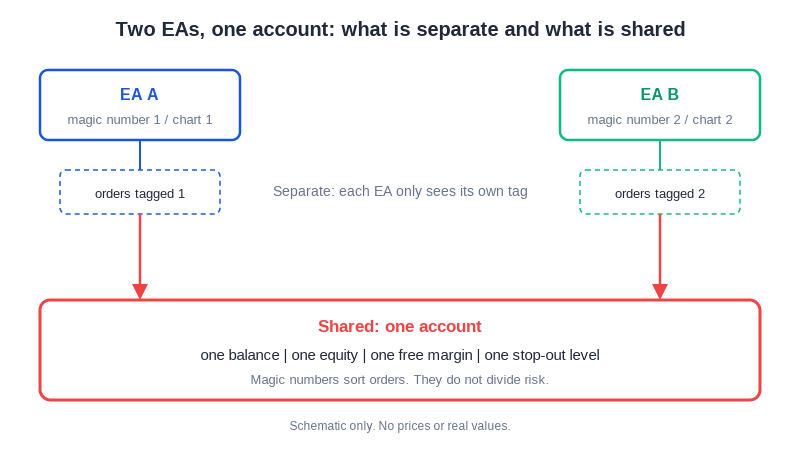
Quick Answer: Give every EA instance its own magic number and its own symbol, because that is what lets an EA find its own orders and ignore everyone else’s. That solves the bookkeeping only. Balance, equity and free margin are shared by the whole account, so several EAs stack their worst cases on one margin pool, and EAs on correlated pairs behave like one larger position. Size the combined account, not each EA on its own.
What a Magic Number Actually Does
A magic number is an integer an EA attaches to every order it sends. MetaQuotes describes the trade request field as the “Expert Advisor ID” that “allows organizing analytical processing of trade orders”, and says each EA can set its own unique ID (as published by MetaQuotes, MQL5 documentation, accessed 2026-11-19). Nothing in the platform enforces uniqueness. If two EAs choose the same number, the terminal treats it as one tag.
We checked this against our own source. All seven of our EAs read their orders back by magic number and by chart symbol, in both the MT4 (ea/*.mq4) and MT5 (ea/*.mq5) files. The defaults are distinct, so attaching different EAs with default inputs does not collide:
| EA | MagicNumber default (as read from source) |
|---|---|
| GridMaster | 202601 |
| SteadyPips | 20260223 |
| SnapBack | 77101 |
| QuickPulse | 103001 |
| BreakWave | 88801 |
| TripleAlign | 111501 |
| DualHorizon | 113501 |
These are defaults only; if you change one, check the others. Note also that the MT5 inputs are declared as long, so very large numbers are fine, but keep them readable so you can spot them in the Trade tab.
The default trap is not one EA against another but one EA against itself. If you attach GridMaster to a second chart, both copies carry 202601. Because our loops also filter on Symbol(), a copy on GBP/USD will not touch a copy on EUR/USD. A second copy on another timeframe of the same symbol has no such protection: both copies would count, cancel and close the same set of orders. That is the failure to prevent with a unique number per instance.
What Breaks When Magic Numbers Collide
An EA that does not filter by magic number is worse: it treats every open position as its own. That includes manual trades. We do not ship any such EA, but third-party ones exist, so read the inputs before trusting them. Typical symptoms when tags overlap:
- Position caps trip early. An EA that counts “my open orders” against a maximum counts the other copy’s orders too and stops opening new ones.
- Closes reach too far. A “close all” or weekend-close routine closes orders that belong to the other instance.
- Pending orders vanish. A grid that cancels its pending ladder on a rebuild cancels the neighbour’s ladder as well.
- Logs lie. The Experts tab shows tickets the EA did not open, which makes later diagnosis slow.
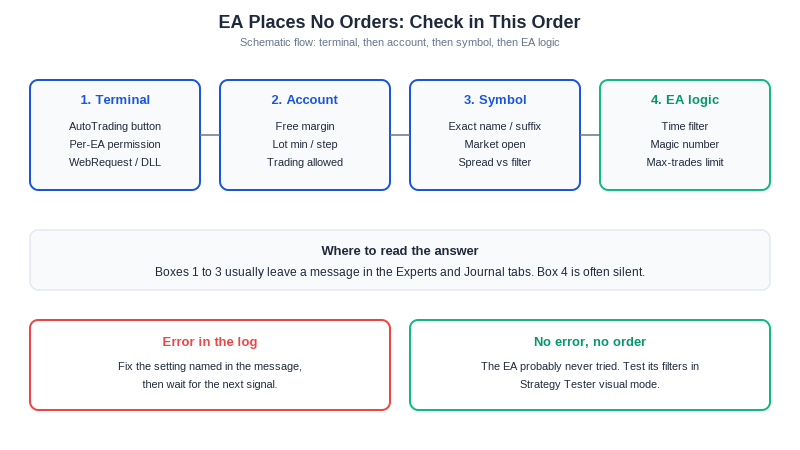
If an EA is silent after you add a second one, the cap counting is the first thing to suspect; our EA not trading checklist lists the magic-number and maximum-trades inputs among its checks.
One more platform fact matters on MT5. MetaQuotes documents that a netting account allows only one position per symbol, while a hedging account lets you open several, including opposite ones (as published by MetaQuotes, MQL5 documentation, accessed 2026-11-19). On a netting account, two EAs trading the same symbol merge into one net position, and the magic number no longer separates them in the position list. Check your account type before running two EAs on one symbol.
The Account Is Shared, Even When the Orders Are Not
Our GridMaster source shows how thin the separation is. Its position cap and lot cap count only its own orders (magic plus symbol). But its drawdown gate compares account balance with account equity, its equity-protection check does the same with a default threshold input of 70%, and its margin gate reads the account’s free margin (ea/GridMaster.mq4, defaults read from source). Another EA’s floating loss therefore lowers the number GridMaster uses to decide whether it may open a new level. That is sensible behaviour, but it means the EAs are coupled through the account even though their order lists are not.
The margin arithmetic is pure formula. Take illustrative inputs only: a 1:100 leverage and a EUR-denominated account. A 0.10 lot position on a EUR-based pair has a notional of 10,000 EUR and needs 100 EUR of margin (notional divided by leverage). Three EAs each holding that position need 300 EUR in total, and the free margin left for any fourth entry is what remains of equity after that sum. The numbers are hypothetical; your broker’s leverage, margin rules and stop-out level are what count, and the stop-out level is set by the broker, not by the EA.
The part that catches people is the worst case. A grid EA can hold several levels at once, and each level adds margin. Add up the maximum number of levels times lot size for every instance, then compare that to your equity, not the average. Our capital guide works through the lot-floor and drawdown arithmetic for one EA; for several, you add the per-EA worst cases first and then run the same test.
Correlation: Two EAs Can Be One Position
Different symbols do not mean different risk. Our correlation table measures the correlation of daily moves between 28 pairs; as of October 30, 2026 (Dukascopy hourly bid candles, Pearson correlation of daily changes, rebuilt monthly), over 250 sessions:
- EUR/USD with GBP/USD read +0.85, and EUR/JPY with GBP/JPY read +0.88. Two EAs on such a pair of pairs are close to one position at double size.
- EUR/USD with USD/CHF read -0.83. Two EAs going the same direction on that pair of pairs partly cancel each other, which means paying spread on both and holding little net exposure.
- EUR/GBP had the lowest average absolute correlation against the other 27 pairs, at 0.19. EUR/USD with EUR/GBP read +0.05.
These readings describe sessions that have already happened and the 20-session figures can differ sharply, so read the current window in the table rather than trusting this paragraph after its date. The rule that follows is simple: treat a group of EAs on pairs reading +0.70 or higher as a single exposure, and size the group as one. If you want a second EA to add information rather than size, use a pair from the low-correlation end.
A Rule-Based Blueprint for Several EAs
Run several EAs on written rules rather than a feeling that the mix looks diversified. The rules we recommend:
- Unique magic number per instance. Record it in a list next to the symbol, timeframe and EA name.
- One account-level worst case. Sum each EA’s maximum open lots at its position cap, convert to margin with the formula above, and require the total to leave free margin untouched at the level you chose in advance.
- Correlation cap. No two EAs in the same direction on pairs at +0.70 or higher unless each lot is reduced so the group matches one EA’s budget.
- Drawdown stop at account level. Pick an equity percentage where you stop all EAs by hand or with a script; per-EA drawdown inputs only see their own rules.
- One change at a time. Add the second EA, run it on a demo for a few weeks of market time, then add the third. Do not attach three at once and wonder which one misbehaved.
- Know the broker rules. Check the account type (hedging or netting) and the broker’s stop-out level in the account terms before sizing.
Most retail traders lose money trading CFDs and forex, and adding more EAs adds more ways to lose, not a smoother result by itself. The blueprint exists to make the extra risk visible before it appears.
Test Procedure on a Demo Account
Use a demo account with the same account type as your live one.
- Attach EA A to chart one with a unique magic number. Attach EA B to a different symbol with another number.
- Wait for each to open a position, or force one on a demo with a short test setting.
- Confirm each EA’s orders are its own: on MT5 the position properties show the magic value, and on MT4 you read it from the EA’s own Experts log lines (GridMaster prints its magic number at start-up; for the others, compare ticket numbers with the EA’s log lines).
- Remove EA B from its chart and confirm EA A’s orders and pending levels are untouched.
- Repeat with identical magic numbers on the same symbol to see what the interference looks like once, on a demo.
- Note the account’s free margin with both running, and compare it with your sum from the blueprint.
Download the EAs from our download page; the GridMaster page lists the inputs mentioned above.
Failure Modes We Watch For
- Copy-paste inputs. A preset reused on the second chart carries the first chart’s magic number.
- Manual trades near an EA. Manual orders carry magic zero by default, so they are safe from an EA that filters properly, but they still draw on the same free margin.
- Terminal restarts. After a restart, an EA rebuilds its state from open orders; a wrong magic number means it can no longer find them.
- Equity gates tripped by a neighbour. One EA’s floating loss can stop another’s new entries, which looks like a bug but is the shared account working as designed.