MT4 vs MT5 at a Glance
MetaTrader 4 and MetaTrader 5 look almost identical at a glance — same charts, same Expert Advisor concept, same broad workflow. Underneath, they are different platforms with an incompatible programming language, a different backtesting engine, and different account-mode rules that directly affect what kinds of EAs will even run correctly. If you’re deciding which one to run an automated strategy on, the surface-level similarity is the least useful thing to go on.
This guide covers the differences that actually change how an EA behaves, not a general feature tour. For what an EA is and how it works mechanically, start with what is a forex Expert Advisor if you haven’t already.
| Factor | MT4 | MT5 |
|---|---|---|
| EA programming language | MQL4, compiled to .ex4 | MQL5, compiled to .ex5 — related to MQL4 but not interchangeable |
| Strategy Tester | Single symbol per run, single-threaded | Multi-currency in one run, real tick-level data, optimization spread across CPU cores |
| Account mode | Hedging only | Hedging or netting — set by the broker per account, not chosen in-platform |
| Architecture | 32-bit, largely single-threaded | 64-bit, multi-threaded |
| New broker licences | MetaQuotes stopped issuing new MT4 licences (as reported by Finance Magnates, January 2018); existing installations still supported | Default platform offered to brokers setting up MetaTrader access today |
| VPS resource use | Lighter, per third-party VPS provider descriptions | Heavier on RAM/CPU, per third-party VPS provider descriptions |
Each row below gets its own section, with the reasoning and the practical consequence for running an EA — not just the one-line summary.
Where This Site’s EAs Stand
Before the comparison goes further: all seven of our free Expert Advisors — SteadyPips, GridMaster, BreakWave, TripleAlign, SnapBack, QuickPulse, and DualHorizon — ship in both builds, a .ex4 file for MT4 and a separate .ex5 file for MT5, available from our download page. You are not choosing a platform to unlock a specific strategy here; every strategy we publish runs on either. The one platform-specific exception is noted below under account modes.
MQL4 and MQL5 Are Not the Same Language
This is the row people misjudge most. An MT4 EA is written in MQL4 and compiled to .ex4; an MT5 EA is written in MQL5 and compiled to .ex5. They are related languages — MetaQuotes’ own migration documentation describes MQL5 as designed to be “maximally compatible” with MQL4 — but not interchangeable. As published by MetaQuotes, the core event functions differ (MQL4’s start()/init()/deinit() versus MQL5’s OnTick()/OnInit()/OnDeinit()), several predefined variables used constantly in MQL4 code (Ask, Bid, Bars) were removed from MQL5 entirely, and indicator buffer handling changed enough that MetaQuotes’ own guidance is that calculation logic often needs to be reconsidered, not just re-syntaxed.
The practical upshot: you cannot take an .mq4 source file, drop it into MT5, and expect it to compile. A real MQL4-to-MQL5 port is a rewrite with the original logic as a reference, not a find-and-replace job. This is why serious EA providers — including us — maintain and compile separate source for each platform rather than promising one file that “works on both.”
Backtesting: Where the Engines Genuinely Diverge
Both platforms include a built-in Strategy Tester, and both can produce a usable backtest. Where they diverge is capability, not just speed.
MT4’s Strategy Tester tests one symbol at a time, single-threaded. If your EA trades several pairs, or if you’re comparing correlated strategies (an EUR/USD trend EA and a GBP/USD trend EA that might fire on the same news event), MT4 cannot show you their combined effect on account equity in a single run — you test each symbol separately and reason about the overlap yourself.
MT5’s Strategy Tester supports multi-currency backtesting in a single run, using real tick-level historical data, and distributes optimization runs across multiple CPU cores. For a multi-symbol portfolio, or for any strategy where correlated drawdown across pairs matters, this is a meaningfully more accurate picture — a run that only shows each pair in isolation can understate combined drawdown when two of your EAs enter at the same time on correlated pairs.
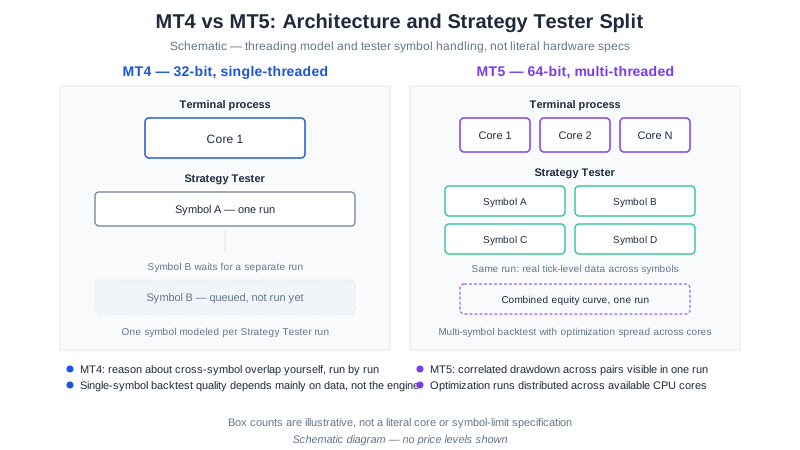
For a single-strategy, single-symbol backtest, the practical gap narrows: what determines backtest quality on either platform is mainly the modelling quality of the historical data feeding it (tick data or 99%+ modelling quality, not the default low-quality bars), not which engine is running it. Our backtesting guide covers how to check that regardless of platform, and why even a high-quality backtest is still a hypothetical result — see our published, hypothetical backtest figures for what that framing means in practice on our own EAs.
Hedging vs Netting: The Account-Mode Difference That Breaks Grid EAs
This is the one platform difference with a direct, non-obvious effect on which EAs will even work as designed.
MT4 has exactly one account mode: hedging. Every order is tracked as its own position, so you can hold a long and a short on the same symbol simultaneously, and a grid EA can lay down multiple same-symbol positions without conflict.
MT5 supports both hedging and netting, and MetaQuotes’ own documentation confirms MT5 “supports several types of accounts, in particular, netting and hedging” — but which one your account uses is set by the broker, per account, not chosen freely by you inside the platform. In netting mode, MT5 collapses all positions on a symbol into a single net position: a new buy order on a symbol where you’re already long simply increases that one position rather than opening a second, independent one.
That distinction matters directly for grid trading. Our GridMaster EA’s MT5 build is designed for an XM Standard (hedging) MT5 account, because its grid logic depends on holding multiple independent positions on the same symbol at once — the same information we publish on the download page and in the GridMaster setup guide. Run it on a netting-mode MT5 account and the grid logic will not behave as designed, because the platform is actively merging the positions it’s trying to hold separately. A single-position-at-a-time EA — a trend-follower like SteadyPips, or a mean-reversion system like SnapBack — has no such dependency and runs identically under either mode.
If you’re setting up an MT5 account specifically to run a grid-style EA, confirm with your broker that the account is opened in hedging mode before you deposit, not after.
Leverage Caps Apply the Same Way on Either Platform
If you’re running an EA through an FCA-, CySEC-, or ASIC-regulated broker entity, the leverage limit is set by the regulator on the account, not by MT4 or MT5 — the platform choice doesn’t change it either way. ESMA caps retail leverage on major FX pairs at 30:1 for EU-regulated accounts (Board of Supervisors decision, 23 March 2018, effective 1 August 2018, as published by ESMA), the FCA applies and has confirmed the same structure permanently for UK retail clients, and ASIC applies the same 30:1 cap for Australian retail clients from 29 March 2021, as published by ASIC. What this changes for an EA specifically is the margin available per lot: an EA whose money-management logic was tuned or backtested against a higher-leverage offshore account will size positions differently — and may hit a margin call sooner — on a capped tier-1 account at the same deposit. Check your EA’s lot-sizing logic against the actual leverage your regulated account carries before running it live, on either platform; our backtesting guide covers matching the backtest’s deposit assumption to that cap.
Broker and Platform Support
MT4 is old enough that its position in the market has shifted from “the default” to “the platform brokers that adopted it years ago still support.” As reported by Finance Magnates in January 2018, MetaQuotes confirmed it would stop issuing new MT4 broker licences to firms that did not already hold one — existing MT4 installations continue to run and be supported for firms that already had a licence, but a broker setting up MetaTrader access for the first time today is generally offered MT5, not MT4. In practice this means MT4 availability is concentrated among longer-established brokers, while newer brokers and newer account types skew toward MT5-only.
For EA traders, the practical question is simpler than the platform’s history: does your broker support automated trading (AutoTrading and WebRequest calls, if your EA phones home for license verification, as ours do) without restriction, on whichever platform you pick. Our XM broker review covers what we specifically tested there — MT4 and MT5 compatibility, WebRequest whitelisting, and EA/grid trading permissions — since broker-level restrictions on automated trading matter more to an EA’s behavior than which MetaTrader version you chose.
Resource Use on a VPS
If you run EAs on a VPS rather than a home PC, platform choice affects the specification you need. MT5 is a 64-bit, multi-threaded application; MT4 is the older 32-bit, largely single-threaded design. Third-party VPS providers consistently describe MT5 as the heavier of the two on RAM and CPU, but the specific figures different providers publish for “how much heavier” vary considerably from source to source, and we have no independent way to verify any single number — so we’re not going to quote one as fact. What we can say with more confidence: our own VPS specification guide recommends 1 GB RAM as a minimum and 2 GB as comfortable for our EAs; if you’re running MT5, or running several terminals on one VPS, treat that as a floor rather than a target, and check actual memory use on your specific plan before committing to it long-term.
Which Should You Actually Run?
For most readers running one of our EAs, the honest answer is: it doesn’t matter much, because we support both, and the strategy behaves the same way on either — with the one exception above for grid trading on a netting-mode MT5 account. The table below turns the row-by-row comparison into a decision:
| If you… | Choose |
|---|---|
| Are opening a brand-new account and your broker only offers MT5 for new signups | MT5 |
| Want to backtest a multi-symbol portfolio, or correlated pairs, in one run | MT5 |
| Have no existing MT4 EAs or history to preserve and are starting fresh | MT5 |
| Already run MT4 EAs or indicators you rely on and don’t want to re-source them | MT4 |
| Have a broker you’ve vetted that only supports MT4 for the account type you want | MT4 |
| Plan to run a grid-style EA on MT5 | Either — but confirm hedging mode with your broker before depositing |
Whichever you land on, confirm your broker permits unrestricted automated trading before you commit — see our checklist for choosing a forex EA for the broader vetting process beyond the platform question.
Open an XM account — it supports both platforms without restriction on automated trading, or read the full review first.
Related Guides
- What Is a Forex Expert Advisor? MT4 & MT5 Guide
- How to Install an EA on MT4 & MT5
- GridMaster Setup Guide
- Do You Need a VPS for Forex EA Trading?
- How to Backtest a Forex EA
This article is educational and not personalised financial advice. Platform features change over time; verify current specifications with MetaQuotes and your broker before choosing. Full disclaimer