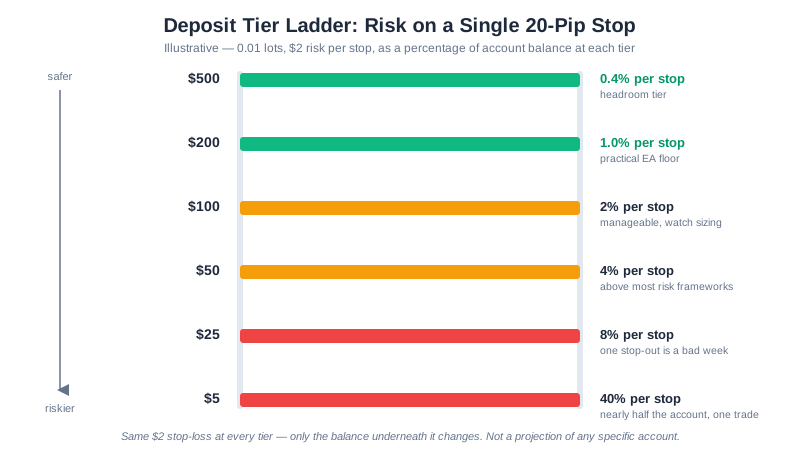
Ask “how much money do I need to run a forex EA?” and most answers point at a broker’s advertised minimum deposit — $5, $50, $100. That answers a different question: what it takes to open an account, not whether that account can size trades the way the EA was configured, survive a losing streak, or absorb the fixed cost of running unattended 24/5. This guide works through the four inputs that set the real number: the 0.01-lot floor, the EA’s expected drawdown at your risk setting, fixed overhead as a share of a small balance, and margin.
Read minimum deposit forex brokers first if you haven’t — it covers the deposit-minimum myth and is the source of the $200/$500 figures used here. This guide builds the fuller capital-planning picture for anyone about to run an EA live, on any broker.
Quick Answer
The honest capital number for running one conservative EA at a time is roughly $200-$300 as a floor and $500-$1,000 for real headroom — not the broker’s advertised minimum deposit. That range comes from four inputs: the 0.01-lot minimum position size, which sets a hard floor on how small your risk-per-trade can go; the EA’s expected drawdown at the risk percentage you configure; fixed monthly overhead like a VPS; and the margin your broker’s leverage tier requires. Below about $300, a typical 1% risk target on a 30-pip stop cannot be sized exactly — the 0.01-lot minimum forces the actual dollar risk up, sometimes to 2-3% of the account on a single stop-out.
Why “Minimum Deposit” Is the Wrong Question
A broker’s minimum deposit is a compliance and marketing number: the smallest amount its systems will accept to open an account. It has no relationship to lot-size granularity, your EA’s stop distance, or what a losing streak costs. XM’s own published minimum, for example, is $5 across several account types (as published by XM, August 2026) — an account-opening threshold, not a trading recommendation. Treating it as one is how a technically-funded account ends up unable to trade its own strategy without over-risking on every stop.
The right question is narrower: given this EA’s stop distance and risk setting, at what balance does position sizing actually work, and does that balance also cover the drawdown, the fixed costs, and the margin? The rest of this guide answers that with arithmetic instead of a rule of thumb.
The Four Inputs That Set the Real Number
1. The 0.01-Lot Floor
Every retail EA sizes a trade with a formula: lots = (balance x risk%) / (stop-loss pips x pip value per lot). The formula has no lower bound of its own — it will happily return 0.0033 lots for a small account. Brokers do: 0.01 lots, a micro lot worth 1,000 units of the base currency and roughly $0.10 per pip on a USD-quoted pair (see lot sizes explained for the full pip-value arithmetic and why it differs on JPY and cross pairs). When the formula’s answer falls below 0.01, the EA either skips the trade or takes 0.01 lots anyway at a higher effective risk than configured. Neither is a malfunction — it is the floor showing up in practice.
2. The EA’s Expected Drawdown at Your Risk Setting
Our backtest results publish drawdown figures with a caveat worth repeating: the sub-1% maximum drawdowns shown there are a function of the small fixed risk fraction used in the test on a $10,000 starting balance, not evidence the strategies are low-risk. As the performance page puts it, raising the risk percentage, running several EAs at once, or running the same logic on a $200 account changes the drawdown percentages completely. SnapBack’s EURUSD result — profit factor 1.65, max drawdown 0.2% (hypothetical backtest, as of July 30, 2026, per the performance page) — describes that specific test’s risk fraction, not what a 1-2% real-money setting would produce on your own balance. Capital needs to cover a drawdown rescaled to your risk percentage, not the tested one.
Once you have that rescaled figure, check what it would take to recover from it:
Drawdown-recovery calculator
Enter a drawdown percentage above to calculate the gain required to break even.
Educational tool, not investment advice. The months-to-recover figure assumes a constant monthly return, which real trading returns are not — treat it as an order-of-magnitude check, not a forecast.
3. Fixed Overhead as a Percentage of a Small Account
Two costs stay roughly the same dollar amount regardless of balance, which is exactly why they hurt a small account more:
- A VPS, if the EA runs unattended. A baseline forex-capable plan runs about $15/month, or $12.80/month on a 12-month prepay (as published by MQL5, August 2026 — see our cheapest forex VPS comparison for three more verified options). On a $200 account that’s roughly 7.5% of the whole balance every month before a single trade closes; on a $2,000 account it’s 0.75%.
- Spread and commission per round trip. An illustrative $2-3 round-trip cost on a frequently-trading EA is forgettable at $2,000 and a real drag at $200 — see forex spreads explained for the full cost stack (spread, commission, swap, slippage).
Neither cost appears in a backtest that models spread as a flat per-trade assumption and ignores VPS fees, so budget for both separately.
4. Margin
Margin is the collateral a broker locks up while a position is open, and it scales with leverage. As published by XM (July 2026), a standard lot of EUR/USD needs roughly $3,333 margin at 1:30 leverage (the cap under EU/UK-style regulation) versus roughly $100 at 1:1000 (a tier some offshore entities offer) — see minimum deposit forex brokers for the full leverage table. At the 0.01-lot sizes this guide mostly concerns, margin is a small fraction of even the smallest balances here regardless of leverage tier — it binds only when running several positions at once or sizing well past 0.01-0.05 lots, closer to how a multi-level grid EA behaves (see the GridMaster capital table).
Worked Example: What 1% Risk Actually Buys at Different Balances
Take a fixed setup — 1% risk per trade, a 30-pip stop, a USD-quoted pair — and compute the exact lot size the formula returns, then round it down to the broker’s 0.01-lot granularity:
| Balance | 1% target risk | Exact lots (unrounded) | Lots after 0.01 rounding | Actual $ risked | Actual % risked |
|---|---|---|---|---|---|
| $100 | $1.00 | 0.0033 | 0.01 (forced minimum) | $3.00 | 3.0% |
| $150 | $1.50 | 0.0050 | 0.01 (forced minimum) | $3.00 | 2.0% |
| $200 | $2.00 | 0.0067 | 0.01 (forced minimum) | $3.00 | 1.5% |
| $300 | $3.00 | 0.0100 | 0.01 | $3.00 | 1.0% |
| $600 | $6.00 | 0.0200 | 0.02 | $6.00 | 1.0% |
| $1,200 | $12.00 | 0.0400 | 0.04 | $12.00 | 1.0% |
The arithmetic behind every row: lots = (balance x 1%) / (30 pips x $10 pip value per standard lot), floored to 0.01. Below $300, the exact lot size wanted is smaller than 0.01, so a trader or EA that takes the trade anyway risks well above the intended 1% — three times the target at $100. At $300 and multiples of it, rounding lands exactly on target because $300 x 1% = $3.00 is exactly what one 0.01 lot risks on this stop; a different stop distance shifts that breakeven balance, which is why the numbers matter for your own EA, not this table’s specific threshold.

Try It With Your Own Numbers
The table above uses one stop distance and one risk percentage. Your EA’s actual settings will differ — plug them in below to see where your own balance lands relative to the 0.01-lot floor:
Position-size calculator
Enter your account balance and stop-loss distance above to calculate.
Educational tool, not investment advice. Verify the calculation and your broker's minimum lot size before placing a trade.
If the calculator returns “below the 0.01-lot broker minimum” for your numbers, that is the exact symptom this guide is about: either add capital, widen the stop, or accept a higher effective risk percentage than planned.
Putting It Together: A Capital-Planning Checklist
- Confirm your EA’s stop distance, then find the balance where 0.01 lots stops overshooting your target risk percentage.
- Rescale the EA’s backtested drawdown to your intended risk percentage rather than reading the performance page figure at face value.
- Add fixed overhead as a separate line: a VPS if the EA runs unattended, plus an estimate of round-trip cost at your trade frequency.
- Check margin only after the above — at 0.01-0.05 lots it rarely binds unless you run several positions or a grid-style EA concurrently.
- Forward-test on a demo account at the balance you actually intend to deposit, not a larger one.
Most retail traders who trade forex and CFDs lose money — XM’s own risk disclosure states that 75.12% of retail investor accounts lose money trading CFDs with that provider (as published by XM, August 2026, quoted in full in our XM broker review). Adequate capital does not change that base rate; it removes one avoidable way of making the outcome worse — over-risking because the account was never large enough to size trades as planned.
Open a free XM account if you want to test this arithmetic on a real balance — start on demo, and fund a live account only with money you can afford to lose in full.
Frequently Asked Questions
What is the minimum capital to run a forex EA?
No single number — it depends on stop distance and risk percentage, not the broker’s deposit minimum. As a practical floor for one conservative EA, roughly $200-$300 is where the 0.01-lot minimum stops distorting typical H1 risk sizing, and $500-$1,000 gives real headroom for a losing streak. Below that, run the arithmetic above for your own EA.
Does a lower broker minimum deposit mean an EA needs less capital?
No. A broker’s minimum deposit is an account-opening threshold, not a trading recommendation, and says nothing about the 0.01-lot minimum, an EA’s drawdown behavior, or fixed costs like a VPS. A $5 deposit minimum and a $300 capital requirement are unrelated numbers.
How does an EA’s backtested drawdown affect how much capital I need?
Backtested drawdown is a function of the risk fraction used in the test, not a fixed property of the strategy. A published 0.2% max drawdown at a small test risk fraction looks completely different at 1-2% real-money risk on a $300 account. Rescale it to your own risk percentage before treating it as a buffer size.
Do VPS costs and spreads matter for how much capital an EA needs?
Yes. A fixed monthly VPS cost is the same dollar amount whether the account is $200 or $2,000, so it consumes a far larger share of a small one. Round-trip spread and commission cost work the same way. Neither appears in a backtest that ignores costs, so budget for both separately.
Further Reading
- Minimum Deposit Forex Brokers — the deposit-minimum myth in full
- Forex Lot Sizes Explained — pip-value arithmetic behind the 0.01-lot floor
- Forex Risk Management Guide — streak arithmetic and position sizing
- Cheapest Forex VPS Options 2026 — verified prices for four MT4/MT5-ready plans
- GridMaster EA Setup Guide — the multi-position case, where margin and drawdown both scale with ladder depth
This article is for educational purposes only and does not constitute financial advice. Trading forex and CFDs on margin carries a high level of risk and may not be suitable for all investors. You could lose some or all of your invested capital. Past performance, including any hypothetical backtested result linked from this page, is not indicative of future results. Read our risk disclosure before trading.