Quick Answer
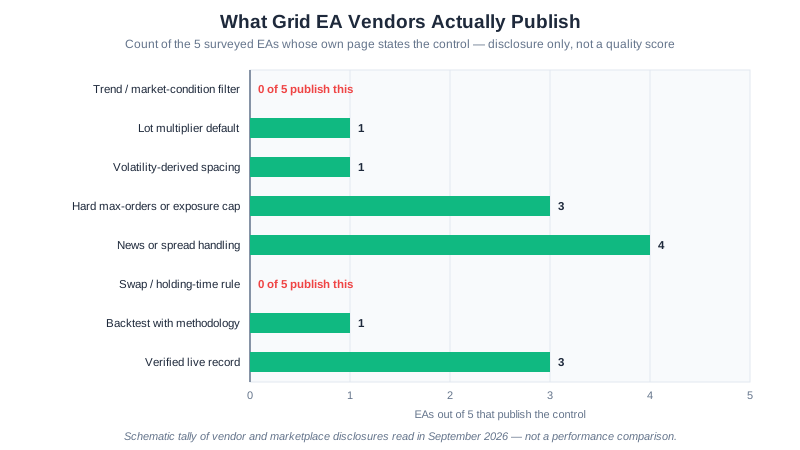
GridMaster EA is a free grid trading Expert Advisor for MetaTrader 4 and MetaTrader 5, downloadable from our download page with no fees or locked features. It places buy and sell orders at fixed price intervals and closes each one at the next level back, and it ships with five layers of risk protection: a maximum drawdown limit, an absolute equity stop-loss, a position cap per direction, a weekend close, and a daily loss limit. The conservative starting profile is 25-pip spacing, 4 levels per side, 0.01 lots per level, a 25-pip take profit and a 15% drawdown cap, on a recommended $500 account. It is built for ranging conditions and is expected to degrade in strong trends, which is why those risk layers matter — and no EA can guarantee profits, so run it on a demo account for 2–4 weeks first.
What Is a Grid Trading EA?
A grid trading EA (Expert Advisor) is an automated trading program that runs on MetaTrader 4 and places buy and sell orders at fixed price intervals without manual intervention. Instead of trying to predict market direction, the EA profits from natural price oscillation by opening positions at each grid level and closing them when price returns to the next level.
The “grid” refers to the pattern of pending orders placed above and below the current price, spaced at equal intervals. As price moves through each level, trades are opened and closed automatically, generating small profits on each completed round-trip.
Grid trading EAs are popular because they remove emotional decision-making from the trading process and can operate around the clock as long as your MetaTrader 4 terminal is running. For the strategy behind the automation, see our grid trading strategy guide.
The Pitfalls That Wreck a Free Grid EA — Check These First
Most of the damage a downloaded EA does happens before the first trade is ever placed, not after. The file is untrustworthy, the broker settings are wrong, or the risk parameters are left on a default nobody reviewed. Work through this checklist before GridMaster EA touches a live account:
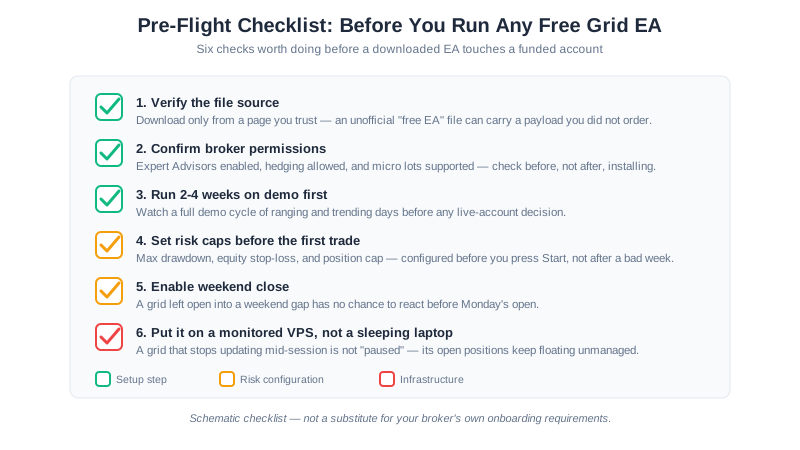
Pitfall 1: Trusting an unverified file. A “.ex4” file is a compiled binary — you cannot read its source before running it. Download GridMaster only from the SteadyPips download page, never from a forum attachment or a random link promising a “leaked” or “cracked” paid version. An EA with hidden logic is a broker credential and a funded account away from doing real damage.
Pitfall 2: Skipping demo testing because the setup steps feel done. Installing correctly is not the same as understanding how the EA behaves through a full week of ranging and trending days. Two to four weeks on demo, covered in What to Do After Installation below, is the point where you actually learn the strategy’s failure mode rather than reading about it.
Pitfall 3: Wrong broker permissions. An EA that cannot hedge or has automated trading blocked at the account level will either refuse to run or behave unpredictably. Confirm hedging, Expert Advisor permissions, and micro-lot support before installation, not after an error message.
Pitfall 4: Leaving risk layers at default values you have not reviewed. GridMaster ships with five layers of risk protection, covered below, but a default threshold is a guess about your account size and risk tolerance, not a recommendation tailored to you. Set the drawdown limit, equity stop, and position cap deliberately.
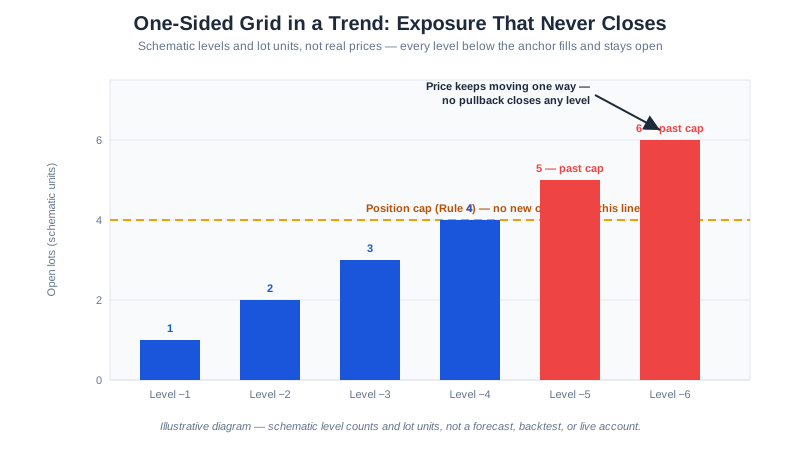
Pitfall 5: Running strong-trend conditions with grid defaults built for ranging markets. Grid trading profits from price oscillation; an EA left running through a sustained directional move keeps accumulating positions on the losing side. The risk layers exist specifically to cap this, which is why Pitfall 4 matters.
Pitfall 6: Leaving the terminal on a machine that sleeps, reboots, or loses its connection. A grid with open positions and no running terminal is not paused — it is unmanaged. This is the case for a VPS, covered in System Requirements below.
Why Use an EA for Grid Trading Instead of Manual Trading
Grid trading requires placing and managing dozens of orders simultaneously across multiple price levels. Doing this manually is not only exhausting but practically impossible to execute consistently. Here is why an EA is the better approach:
Speed and precision. An EA places orders at exact price levels within milliseconds. Manual traders often miss entries or set incorrect prices, especially during volatile market conditions.
24/5 operation. The forex market runs around the clock from Monday to Friday. An EA can monitor and trade every session — Asian, European, and American — without fatigue or sleep breaks.
Emotional discipline. Grid trading requires strict adherence to predefined rules. When drawdown increases during a trend, manual traders tend to panic and close positions at the worst time. An EA follows its rules regardless of market sentiment.
Consistent risk management. Every position size, stop level, and take profit is calculated and applied automatically based on your configured parameters. No shortcuts, no overrides, no “just one more lot.”
Multi-pair capability. A single EA instance can manage a complex grid on one pair, and you can run multiple instances across different currency pairs simultaneously.
GridMaster EA Features
GridMaster EA is a free Expert Advisor for MetaTrader 4 and MetaTrader 5, built specifically for grid trading on major forex pairs. It includes several features that distinguish it from basic grid scripts:
Five Layers of Risk Protection
Maximum drawdown limit — The EA monitors your account equity in real time and closes all grid positions if drawdown exceeds your configured threshold (default: 20% of account balance).
Equity stop-loss — An absolute equity floor below which the EA will not allow the account to fall. This is a second, absolute limit independent of the percentage-based drawdown limit. Both layers limit how much a single configuration can lose; they do not make automated trading safe.
Position cap per direction — Limits the maximum number of buy or sell orders that can be open simultaneously. This prevents the grid from expanding indefinitely during a strong trend.
Weekend close — Automatically closes all open positions before the Friday market close to avoid gap risk over the weekend. Markets can gap significantly on Monday open due to weekend news events.
Daily loss limit — If the EA’s realized losses for the current day exceed a set amount, it stops opening new positions until the next trading day.
Auto Lot Sizing
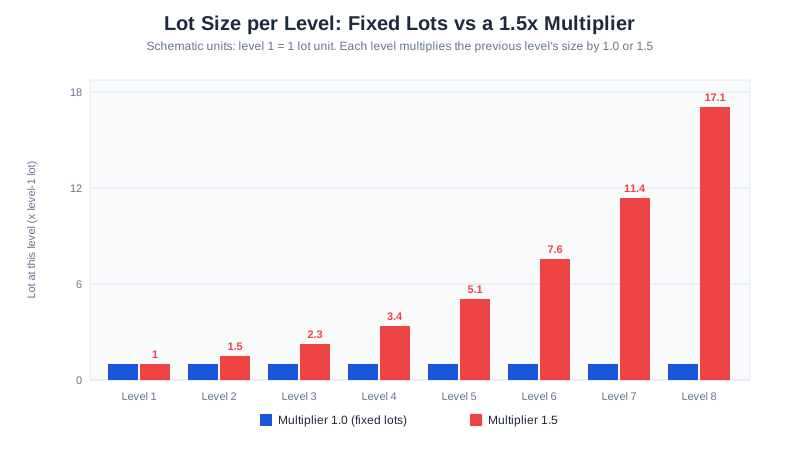
GridMaster automatically calculates position size based on your account balance and risk settings. As your account grows, lot sizes scale proportionally. If your account shrinks, lots decrease to preserve capital. You can also set a fixed lot size if you prefer manual control.
Configurable Grid Parameters
Every aspect of the grid is adjustable: spacing between levels, number of grid levels, take profit distance, and the reference price around which the grid is centered.
Spacing is the input worth thinking hardest about, because a value that suits today’s volatility will not suit next month’s. Our guide to dynamic grid trading covers the alternative of deriving spacing from an ATR multiplier so the ladder re-scales itself, and explains what changes in the risk profile when it does.
System Requirements
Before downloading GridMaster EA, make sure you have the following:
| Requirement | Details |
|---|---|
| Trading Platform | MetaTrader 4 (MT4) or MetaTrader 5 (MT5) — this guide walks through the MT4 build |
| Broker | Must allow Expert Advisors and hedging |
| Minimum Account | $500 recommended (micro lots) |
| Operating System | Windows 7/10/11, or a Windows VPS |
| Internet | Stable connection (VPS recommended for 24/5 uptime) |
GridMaster EA ships with EUR/USD defaults but can be configured for other major pairs. If you do not yet have an MT4-compatible broker account, XM supports all the required features including micro lots, hedging, and automated trading.
How to Download and Install GridMaster EA
Follow these steps to get GridMaster EA running on your MetaTrader 4 terminal:
Step 1: Register a Broker Account
If you do not already have an MT4-compatible broker account, you need one before the EA can be activated. Open an XM account here — the process takes about 5 minutes, and you can start on a demo account so the EA runs on simulated funds rather than your own money.
After registration, navigate to the registration page on SteadyPips to link your account number.
Step 2: Download GridMaster EA
Visit the SteadyPips download page and download the GridMaster EA file (GridMaster.ex4). The file is a compiled Expert Advisor ready to be installed into MetaTrader 4.
Step 3: Install into MT4 Experts Folder
- Open your MetaTrader 4 terminal.
- Click File > Open Data Folder.
- Navigate to
MQL4>Experts. - Copy the
GridMaster.ex4file into this folder. - Restart MetaTrader 4 (or right-click the Navigator panel and select Refresh).
GridMaster EA should now appear in the Navigator panel under Expert Advisors. For a more detailed walkthrough with screenshots, see the How to Install an EA guide.
Step 4: Attach to a Chart and Configure
- Open a EUR/USD chart (H1 timeframe recommended).
- Drag GridMaster EA from the Navigator panel onto the chart.
- In the settings dialog, configure your grid parameters. See the table below for recommended starting settings.
- Make sure AutoTrading is enabled (the button in the MT4 toolbar should show a green arrow).
- Click OK to start the EA.
For a complete parameter reference, see the GridMaster Setup Guide.
Recommended Settings for Beginners
Start with the conservative profile and adjust only after you have observed at least 2-4 weeks of demo trading results.
| Parameter | Conservative | Moderate | Aggressive |
|---|---|---|---|
| Grid Spacing (pips) | 25 | 20 | 15 |
| Grid Levels (per side) | 4 | 6 | 8 |
| Lot Size (per level) | 0.01 | 0.01 | 0.02 |
| Take Profit (pips) | 25 | 20 | 15 |
| Max Drawdown (%) | 15% | 20% | 25% |
| Position Cap (per direction) | 4 | 6 | 8 |
| Weekend Close | ON | ON | ON |
| Recommended Capital | $500 | $800 | $1,500 |
Conservative is best for beginners and small accounts. The wider spacing means fewer trades but also fewer simultaneous open positions during trends.
Moderate is a balanced approach suitable for traders who have tested on demo and understand how grid drawdowns work.
Aggressive generates more trades and higher potential returns, but requires significantly more capital to survive adverse moves. Only use this after thorough backtesting.
What to Do After Installation
Once GridMaster EA is running, close the loop on the checklist above rather than treating installation as the finish line:
- Monitor for the first 24-48 hours to confirm the EA is placing and closing orders as expected — this is where a broker-permission mistake from Pitfall 3 typically surfaces first.
- Check the Experts tab in MT4 (at the bottom of the terminal) for any error messages.
- Review your trade history at the end of each week against the grid parameters and risk caps you set in Pitfall 4.
- Read the backtesting guide at How to Backtest a Forex EA to validate your settings against historical data before going live.
- Start on demo for at least 2-4 weeks before committing real capital, per Pitfall 2 — do not shortcut this step because installation went smoothly.
Recommended Reading
- How to Set Up Grid Trading in Forex — complete 10-step setup guide
- Dynamic grid trading strategy — ATR-derived spacing for the EA’s grid parameters
- GridMaster parameter settings by account size — detailed parameter reference
- Our full GridMaster risk and feature assessment — the developer review of what it does and where it breaks
- How to Backtest a Forex EA — test your settings before going live
- Grid Trading vs Martingale — understand the key differences
Grid trading involves significant risk, including the potential for large drawdowns during trending markets. Past performance and backtesting results are not indicative of future results. This article is for educational purposes only and does not constitute financial advice. Always trade with money you can afford to lose and start on a demo account before risking real capital.