Quick Answer: A grid EA has four settings that decide how much it can lose: the step (pips between levels), the lot multiplier (how much each deeper level grows), the take-profit (how far price must return to close a level) and max orders (how many levels may be open). The step sets how fast levels fill, the multiplier sets how fast size grows, and max orders caps the stack, so the worst case comes from all of them together, not from any single one. Most retail forex traders lose money, and no setting changes that.
The Four Settings and What Each One Controls
Every grid EA names these differently (GridSizePips, LotFactor, MaxTrades), but the mechanics are the same. In the lab we sort every input on an EA’s parameter sheet into one of four buckets before running anything, because the failure patterns in why grid EAs blow up all trace back to one of them.
| Setting | Common names | What it controls | Direction of risk |
|---|---|---|---|
| Step | grid size, spacing, distance | Pips between levels, so how quickly a move fills the ladder | Smaller step means faster fills and a faster-building stack |
| Multiplier | lot factor, lot exponent, recovery | Lot size at level n relative to level n-1 | Above 1.0, size grows geometrically |
| Take-profit | TP, profit target, basket TP | How far price must return before a level closes | Larger TP means levels stay open longer |
| Max orders | max trades, max levels, MaxOpenPositions | Number of positions allowed open at once | Higher cap means a larger worst case |
For the ladder itself, see what grid trading is; this guide only covers how the inputs interact.
Grid Step: Pips Between Levels
A step is a distance, and a distance only means something relative to how far the pair normally travels. The same 20-pip step is a handful of fills on a quiet pair and a ladder that fills in one session on a volatile one. Our rule-based grid blueprint derives the step instead of choosing it: step = ADR(20) / N, floored at a multiple of the typical spread, where N is typically 4 to 8.
Read the pair’s ADR from the average daily range table, which is rebuilt from Dukascopy data and carries its own as-of date, then decide N. A larger N gives a narrower step and more fills per swing, but also a stack that builds faster in a trend. If you would rather start from an ATR reading, the grid spacing calculator applies the same formula and estimates how many levels your account can fund.
The step also sets the reward. With a fixed 0.01 lot on a USD-quoted pair, one pip is worth $0.10 (the standard convention of $10 per pip per lot), so a 20-pip step closes each winning level for $2.00 gross, before spread. That arithmetic is the whole reward side of a grid, and it does not grow when the stack does.
Lot Multiplier: Where Size Compounds
With multiplier m, the lot at level i is lot x m^(i-1). At 1.0 it is flat. At 1.5 it compounds, and the chart shows how steeply: by level 8 the lot is about 17 times the first level’s.
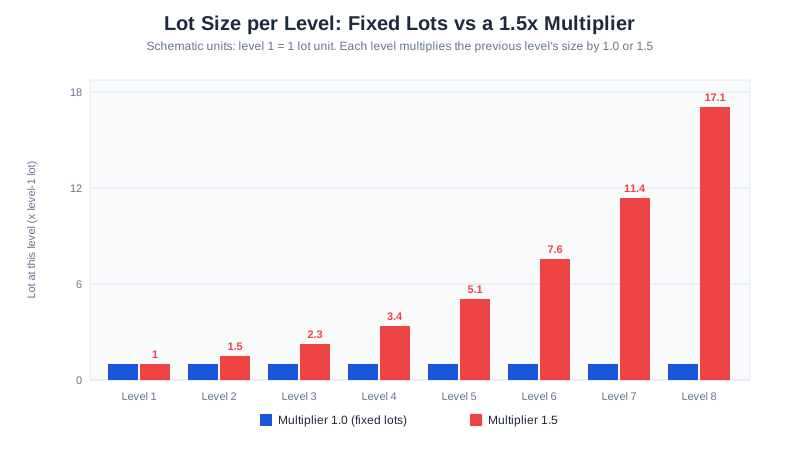
A multiplier pulls the average entry closer to price, so a smaller retracement closes the basket, which is why it looks safer while it works. The cost sits on the other side: when the move does not retrace, the loss grows geometrically. We treat any input that escalates size as a different strategy, covered in grid trading vs martingale, and we leave the multiplier at 1.0.
Take-Profit: How Far Price Must Return
Most grid EAs close each level one step away from its entry, which is the default in our blueprint. Moving the take-profit changes two things.
- TP smaller than the step. Levels close sooner and the stack stays shallower, but each win is a smaller number against the same spread, so the cost share of every win rises.
- TP larger than the step. Each win is bigger, but a level needs a bigger retracement to close, so levels overlap, stay open longer and pay more swap while they wait.
A basket take-profit (closing the whole stack at a net money target) behaves differently again, because it ties every level’s exit to the others. That is how a deep stack can sit open for weeks, so check whether your EA’s profit target is per level or per basket before you trust a backtest of it.
Max Orders: The Cap That Sets the Worst Case
Max orders is the only one of the four that is a ceiling instead of a rate, and it is the setting most often left at a default someone else chose. The cap decides how many levels can ever fill, so it is the worst case the other three settings get multiplied into.
Here is the worked example we use, with arithmetic only: a 20-pip step, 0.01 lot at level 1, a USD-quoted pair, a cap of 10 levels, and a one-way move of 220 pips (eleven steps, so the whole ladder fills). Per-level floating loss is lot x $10 x (move - level x step), summed over the filled levels.
| Multiplier | Lot at level 10 | Total lots open | Floating loss at 220 pips | Share of a $2,000 account |
|---|---|---|---|---|
| 1.0 | 0.01 | 0.10 | $110.00 | 5.5% |
| 1.5 | about 0.38 | about 1.13 | about $640 | about 32% |
Same step, same cap, same price path: the 1.5 multiplier produces roughly 5.8 times the loss, and the stack holds more than eleven times the lots. These are model outputs from the formula, not results from any account. The 5.5% row is also why we size the lot backwards from an acceptable drawdown, as in the per-level sizing rule, instead of picking 0.01 because it is the minimum.
Run Your Own Numbers
The simulator below takes the same inputs as the table: spacing, level-1 lot, multiplier, cap, pair, equity, and a one-directional adverse move you choose. It lists every filled level with its lot, its floating loss and the cumulative loss as a percentage of equity. If you enter an acceptable drawdown, it names the level at which that line is crossed, and it compares your multiplier against a fixed-lot run of the same ladder.
Grid blow-up simulator
Enter spacing, lot size, cap, pair, equity, and an adverse move above to run the simulation.
Educational tool, not investment advice. Margin, swap, and spread are not modelled — only the pip-distance floating loss per level. A real account can be stopped out by margin before this simulation's cumulative loss is reached. Verify against your own broker's contract specification and margin requirements.
To read it, start with the multiplier at 1.0 and raise the move until the drawdown line is crossed; the level it names is the real limit of your risk, whatever the cap says. Then change only the multiplier and watch how much earlier the line is crossed. The tool does not model margin, swap or spread, so a real account can be stopped out before the loss it prints. Treat its output as a floor on the damage, not a forecast.
Settings That Interact: The Margin Cliff
The four settings multiply, which is why tuning one at a time misleads.
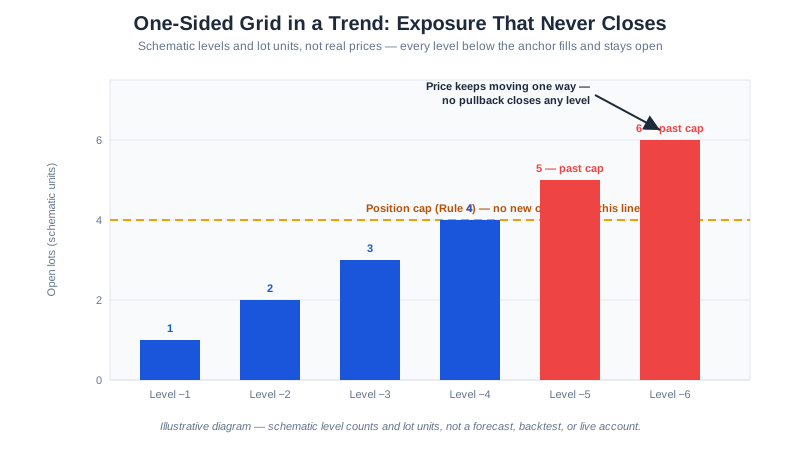
- Multiplier x max orders is the cliff. At 1.0 each extra allowed order adds the same lot. Above 1.0 each one is bigger than the last, so raising the cap from 8 to 10 costs far more than the same change on a fixed-lot grid, and the margin the deepest levels need typically arrives before the EA’s own logic closes the stack.
- Step x max orders is the reach. The ladder covers
step x cappips. If that is less than a normal trending week for the pair, the cap will fill and the account will sit with a full stack. - TP x step is the cost ratio. A take-profit that sinks toward the typical spread means the account pays for the right to trade.
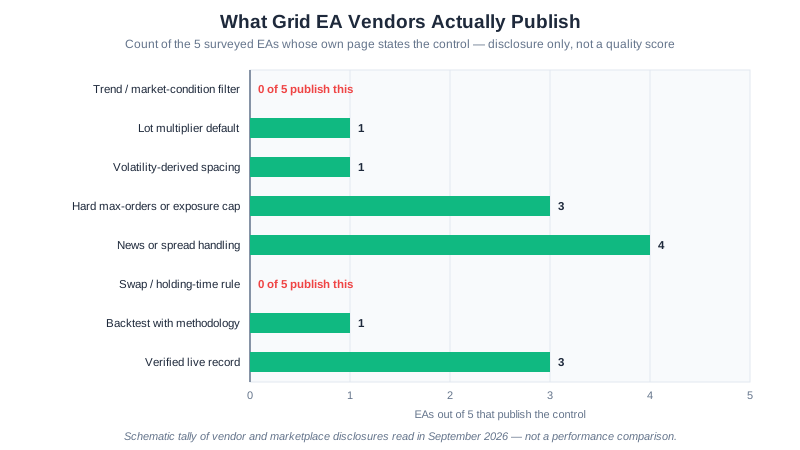
The GridMaster defaults sit at the conservative end: a flat 1.0 lot multiplier, a 20-pip step and a hard cap on concurrent positions, all listed on its EA page. Its backtest figures, which are hypothetical and labelled as such, are on /performance/. We have not published a demo or live record for it yet, so we make no performance claim here.
A Rule-Based Settings Checklist
This is a checklist of conditions, not a settings file; the numbers come from your own account and pair.
- Step: derive it as ADR(20) / N for your pair, then confirm it clears K times the typical spread, the blueprint’s floor.
- Multiplier: exactly 1.0. If the EA has a recovery or averaging mode, switch it off.
- Take-profit: one step per level, per level rather than per basket, unless you have tested the basket version on its own.
- Max orders: choose it last. Pick the drawdown you accept, then solve the lot from
MaxFloat = lot x pip_value x step x L x (L+1) / 2. If the lot falls below the broker’s minimum, lower L or fund a bigger account. - Equity stop: set a fixed drawdown from peak that closes everything, independent of the cap.
- Test on a demo first. Open a demo account through our XM demo account link and run the settings for several weeks before any real money, and compare how deep the stack gets against what the simulator predicted.
For one EA’s inputs set out by account size, see the GridMaster setup guide.
![Best Forex Pairs for Grid Trading: 7 Ranked by Range [2026]](/images/charts/best-forex-pairs-for-grid-trading-ranging-vs-trending.svg)