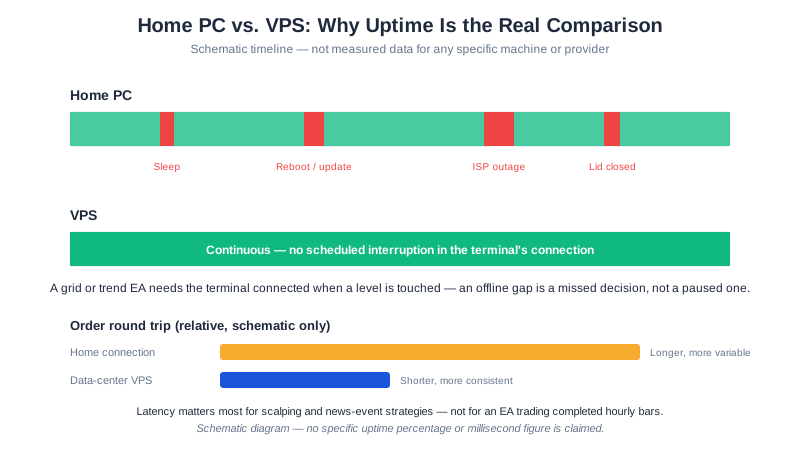
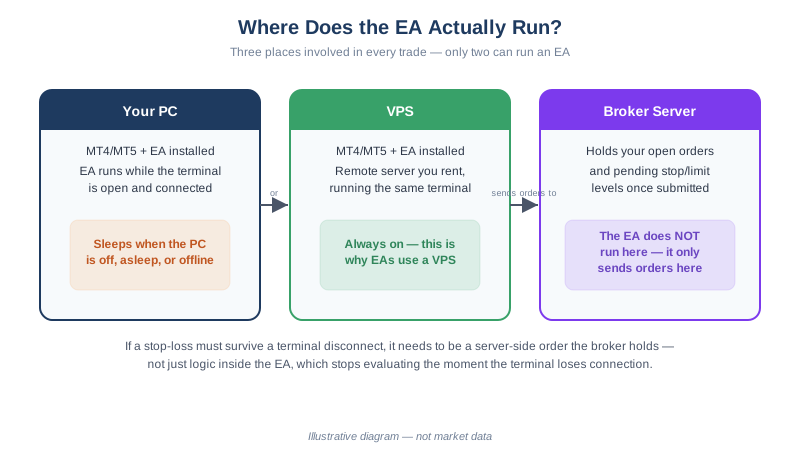
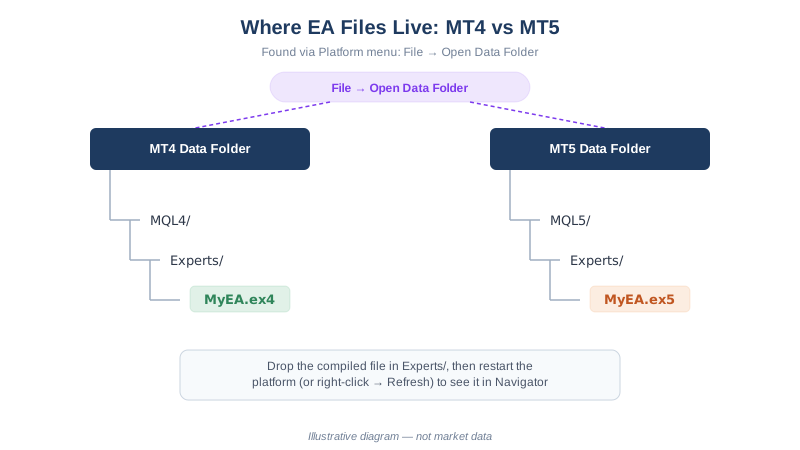
Every forex Expert Advisor needs somewhere to run continuously during market hours — either your own computer, kept on and connected five days a week, or a rented server built for exactly that. The concept of why uptime matters is covered in our VPS for forex EA trading guide; this page answers the narrower, more practical question readers usually ask next: is it actually worth paying for a VPS, or can a home PC left running do the same job for less? The honest answer depends on what you’re optimizing for — raw monthly cost, or the number of things that can knock your EA offline — and those two answers aren’t the same.
Quick Answer
On electricity alone a home PC is cheaper, but that is not the comparison that decides it. Running a desktop 24/5 works out at roughly 39 kWh a month on this guide’s labelled 75-watt assumption — about $6.75 in the US at 17.30 cents/kWh (the 2025 average residential price, as published by the U.S. Energy Information Administration) or £10.18 in the UK at 26.11 pence/kWh (the Direct Debit price-cap unit rate for 1 July–30 September 2026, as published by Ofgem). Entry Windows-ready VPS plans run $12.80–$16.10 a month, as published by providers, August 2026. What the extra money buys is fewer single points of failure: a VPS moves your power supply and your ISP out of the chain, though it does not remove OS update reboots. A single EA trading completed H1 bars with broker-side stops is fine on a home PC; a grid or actively-managed EA, whose drawdown protections stop being evaluated the moment the terminal does, is the case a VPS is priced to cover.
Why “24/5,” Not “24/7,” Is the Real Requirement
Forex markets trade continuously from the Sunday evening open through the Friday evening close in most time zones, then sit idle over the weekend. An EA only needs its terminal open and connected during that window — a home PC or VPS running 24/7 covers it with room to spare, but 24/5 is the actual bar, and it matters for the electricity math below: two idle weekend days are a real, if small, saving either setup can capture by shutting down between the Friday close and Sunday open, if you’re disciplined enough to remember both ends of that toggle.
What a Home PC Actually Costs to Run 24/5
The honest starting point is that nobody publishes a single verified “wattage an MT4 terminal draws,” because it depends on the machine, not the software — a five-year-old office desktop and a gaming tower with a discrete GPU pull very different amounts of power at idle. Treat the number below as a labeled assumption you should replace with your own PC’s measured draw (an inexpensive plug-in power meter gives you an exact figure), not a verified industry average:
- Assumption: a mid-range desktop with the monitor powered off draws roughly 60–90 watts while idling with MT4/MT5 open. This guide uses 75 watts, the midpoint, purely for illustration.
- Runtime: 24 hours a day, 5 days a week ≈ 120 hours/week ≈ 520 hours/month.
- Energy used: 0.075 kW × 520 hours ≈ 39 kWh/month.
Applying published residential electricity rates to that assumption:
- United States: 39 kWh × 17.30 cents/kWh (the 2025 U.S. average residential price, as published by the U.S. Energy Information Administration) ≈ $6.75/month.
- United Kingdom: 39 kWh × 26.11 pence/kWh (the Direct Debit price-cap unit rate for 1 July–30 September 2026, as published by Ofgem) ≈ £10.18/month.
Electricity pricing varies by country, state, and even time of day for readers on a variable tariff, so if you’re in the EU or Australia, run the same 39 kWh figure against your own supplier’s published rate rather than trusting a single number for every region. What this arithmetic doesn’t capture: component wear from continuous operation, the opportunity cost of a machine you can’t fully power down or use for anything that competes with the terminal’s connection, and — the part a monthly bill never shows — that none of this includes a support line to call when your router drops.
What a VPS Costs
Our companion guide, Cheapest Forex VPS Options 2026, verified four current plans directly against provider pricing pages. The cheapest with Windows and forex-relevant specs included was MQL5’s own VPS service at $15.00/month billed monthly, or $12.80/month effective on a 12-month prepay, as published by MQL5, August 2026 — several times the home-PC electricity estimate above. That gap is the price of the things electricity math doesn’t capture: a datacenter’s redundant power and network, no competition for household bandwidth, and (for some plans) proximity hosting near broker servers that lowers order latency, a factor that matters for scalping and news-event strategies and is close to irrelevant for an EA trading completed H1 bars, as detailed in the VPS guide linked above.
Where 24/5 Uptime Actually Breaks
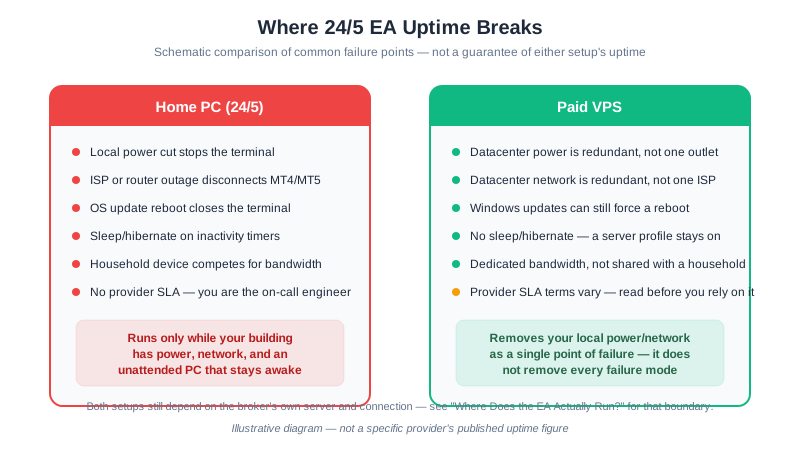
The two setups fail differently, not just at different rates. A home PC’s uptime depends on your own power supply, your own router or ISP, and whatever your operating system decides to do with a scheduled update — three single points of failure with nobody but you responsible for any of them. A VPS moves the power and network dependency into a datacenter built with redundancy a household circuit doesn’t have, which is the actual thing you’re paying for. It does not buy immunity from everything: Windows Server updates can still force a VPS to reboot, and providers’ own SLA terms — how much downtime they guarantee, and what they owe you if they miss it — vary enough that reading one before you rely on it is worth the ten minutes.
Home PC vs VPS: Side-by-Side
| Factor | Home PC (24/5) | Paid VPS |
|---|---|---|
| Monthly running cost | ≈ $6.75 (US) / £10.18 (UK) on the electricity assumption above | $12.80–$16.10/month for entry Windows-ready plans, as published by providers, August 2026 (full comparison) |
| Upfront cost | None if you already own the PC | None — monthly billing |
| Power outage at your location | Terminal stops | Unaffected — server isn’t at your location |
| Your ISP or router fails | Terminal disconnects | Unaffected |
| OS update reboot | Terminal closes unless auto-restart is configured | Can still happen; same mitigation applies |
| Bandwidth contention | Shared with everything else in the household | Dedicated to the server |
| Support if something breaks | You troubleshoot it yourself | Provider support line, per plan terms |
| Best fit | Single EA, broker-side stops set, occasional reconnect gaps tolerable | Multiple EAs/terminals, grid or actively-managed strategies, or you can’t tolerate a missed reconnect |
A Decision Framework, Not a Universal Answer
Neither option is categorically “right.” A single trend-following EA on one H1 chart, with a stop-loss and take-profit already resting on the broker’s server, keeps that protection live even if your PC goes dark for an hour — you only lose new-signal detection until you’re back online, and a home PC is a reasonable place to start, especially while you’re still learning how your own setup behaves under real conditions on a demo login before funding a live XM account. An EA that manages several open positions continuously, or evaluates its own drawdown protections the way a grid EA does, is a different case: those checks do nothing while disconnected, and the gap between “usually fine” and “the one week it wasn’t” is exactly what a VPS is priced to close.
None of this changes the base rate underneath either setup: 75.12% of retail investor accounts lose money trading CFDs with XM, as published by XM in its regulatory risk disclosure, August 2026 — a figure comparable regulated brokers publish in a similar range. Uptime, whether from a home PC or a VPS, keeps a strategy running as designed. It does not change whether that strategy has an edge, and its monthly cost — six dollars or sixteen — should be sized against what you can keep paying through a losing month, not against what a winning one might return.
FAQ
Is a home PC actually cheaper than a VPS for running an EA 24/5?
On electricity alone, usually yes — a few dollars or pounds a month against $12.80 or more for an entry VPS plan. Electricity isn’t the whole cost: a VPS also buys datacenter-grade power and network redundancy a home setup doesn’t have.
What’s the real risk of running an EA on a home PC instead of a VPS?
Concentration risk: your own power, internet, and OS updates are the only things standing between your terminal and an outage, with no redundancy and no provider to call. A single bad night can stop the terminal until you notice.
Does a VPS eliminate all the failure modes a home PC has?
No. It removes your local power and network as single points of failure, but Windows Server updates can still force a VPS to reboot, and providers’ SLA terms differ — read one before assuming zero downtime.
Do I need a VPS if I’m only running one EA on one currency pair?
Not necessarily, if its stop-loss and take-profit are already resting with the broker — a missed reconnect then costs you signal detection, not an open position. Actively-managed strategies like grid EAs depend on the terminal staying connected far more.
Further Reading
- Do You Need a VPS for Forex EA Trading? — the underlying concept, free-VPS conditions, and monitoring routine this page assumes
- Cheapest Forex VPS Options 2026 — verified provider pricing if you decide a VPS is worth it
- How to Install an EA on MT4 & MT5 — the setup step on either a home PC or a VPS
- MT4 vs MT5 for Expert Advisors — resource use differs by platform, which affects either setup’s headroom
- GridMaster Setup Guide — an EA type where continuous connection matters most
This article is for educational purposes only. Trading forex carries significant risk. Full disclaimer