Quick Answer: Slippage is the difference between the price an EA asked for and the price it received, and you can only measure it by keeping both numbers for every trade. The MT4 slippage argument and the MT5 deviation field set the maximum difference the EA will accept, in points. Signed per trade (fill minus requested for a buy, requested minus fill for a sell), the figure is positive when you got a worse price. Collect it on a demo or small live account, split it by time of day, and wait for a real sample before drawing a conclusion. Most retail traders lose money, and execution cost is one quiet reason.
What Slippage and Requotes Are
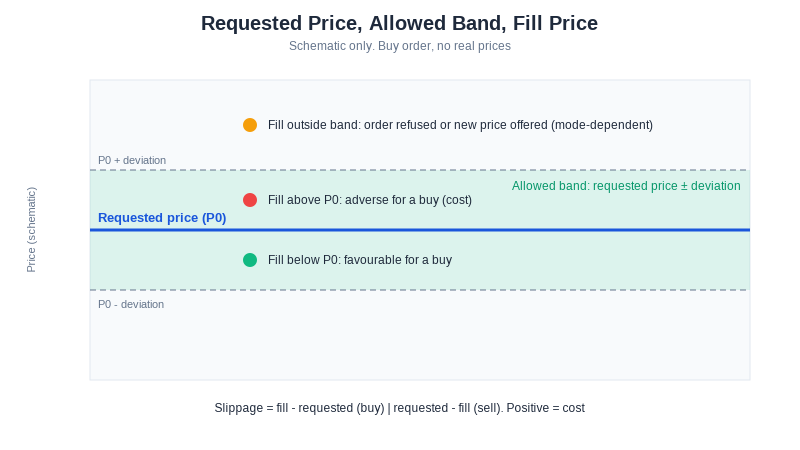
Slippage is a fill at a price other than the one requested. It can go either way: a buy filled lower than requested is favourable, a buy filled higher is a cost. A requote is a different event: the server refuses the order at your price and offers a new one.
MetaQuotes’ MT5 trading help defines deviation as “the difference between the order execution price and the specified price to which a trader agrees”, and says that if the difference is within the value “the order is executed at the new price without any notification” (as published by MetaQuotes, MetaTrader 5 help, accessed 2026-11-20). The MT4 OrderSend page describes the parameter as the “maximum price slippage for buy or sell orders”, and says that when the requested price is stale but still in the feed, the order opens at the current price only if it lies within price plus or minus slippage (as published by MetaQuotes, MQL4 documentation, accessed 2026-11-20).
We keep the vocabulary strict because the three words get mixed up. The deviation setting is your tolerance. Slippage is the realised difference. A requote is the server saying no and offering something else.
Execution Modes Decide Whether Requotes Exist
The same MetaQuotes help page describes four execution modes, and they behave differently:
| Mode | What MetaQuotes says (accessed 2026-11-20) |
|---|---|
| Instant | Executes at the offered price; if the price moves by more than the Deviation during processing, the server can refuse and offer new prices, valid for a few seconds |
| Request | The price is requested first, then the market order executes at the price received |
| Market | The broker decides the execution price; sending the order means advance consent to it |
| Exchange | A Buy or Sell click creates an order to the broker for a deal |
The MQL5 trade-request reference adds that deviation is among the mandatory inputs for opening a position in Request and Instant execution, and not in Market or Exchange execution (as published by MetaQuotes, MQL5 documentation, accessed 2026-11-20). In plain terms, with market execution the order is accepted at the price the broker assigns, so the requote negotiation does not appear, but the fill can still differ from what the chart showed. Check which mode your symbol uses before you decide what to measure. In MT5 the symbol property is SYMBOL_TRADE_EXEMODE, and the broker sets it per symbol, so two symbols on one account can differ.
What Our EAs Actually Expose
We read the source before writing this, and the answer is uneven.
- Six EAs expose an input called
Slippage, default 3:QuickPulse,DualHorizon,BreakWave,SnapBack,TripleAlignandGridMaster. For GridMaster the source comment reads “Maximum allowed slippage in points”. - Five of them scale for 5-digit brokers.
QuickPulse,DualHorizon,BreakWave,SnapBackandTripleAlignmultiply the input by 10 when the symbol has 3 or 5 digits, so the default 3 becomes 30 points, which is three pips. GridMasterpasses the input through unscaled in both its MT4 and MT5 files, so its default 3 means 3 points on a 5-digit symbol, a tenth of three pips. That is a tighter tolerance than the other EAs, and it is one reason to measure rather than assume.SteadyPipshas no slippage input. Its MT4 file sets an internal value of 30 for 3- and 5-digit symbols and 3 otherwise.- In the MT5 files the value reaches the trade through
SetDeviationInPoints.
None of this says what fills you will get. It only says what tolerance each EA sends with its orders. GridMaster’s order routine also retries a failed order up to MaxRetries (default 3) with a RetryDelayMs pause (default 500), which is relevant if your log shows repeated attempts.
How to Measure It: The Per-Trade Formula
Define the requested price R and the fill price F, and the symbol’s point size. For each trade:
- Buy: slippage in points = (F - R) / point
- Sell: slippage in points = (R - F) / point
With this sign convention a positive number is a cost and a negative number is price improvement. Many sources reverse the sign, so write your convention at the top of your log. Convert to pips by dividing by 10 on 3- and 5-digit symbols.
Illustrative example, not real data: suppose an EA requests a buy at 1.00000 on a 5-digit symbol (point 0.00001) and the deal prints at 1.00012. Slippage is 12 points, or 1.2 pips, a cost. If the next buy requests 1.00000 and fills at 0.99996, slippage is -4 points, an improvement. Both numbers are invented to show the arithmetic.
Where to Find the Two Prices
In MT5, open the History tab and switch between Orders and Deals. The order records what was sent and its state; the deal records the fill price, and one order can produce several deals if it fills in parts. Match them by order ticket. In MT4, the account history lists the executed order’s open price but gives you no separate record of what you asked for, so keep the requested price yourself in the EA.
That second approach works on both platforms and is the one we trust: record the request at the moment of sending.
Logging It Inside the EA
In MT4, store the price you passed to OrderSend, then after a successful call select the order and read OrderOpenPrice():
double req = Ask;                       // requested price for a buy
int t = OrderSend(Symbol(), OP_BUY, lots, req, slip, 0, 0, "", magic);
if(t > 0 && OrderSelect(t, SELECT_BY_TICKET))
   Print("slip_pts=", (OrderOpenPrice() - req) / Point);
In MT5, handle OnTradeTransaction. MetaQuotes documents that for deal transactions the structure carries the deal ticket, the deal price and the order ticket the deal came from, and warns that one request can produce several transactions with no guaranteed arrival order (as published by MetaQuotes, MQL5 documentation, accessed 2026-11-20). So store the request in a map keyed by order ticket, and compute slippage when the matching TRADE_TRANSACTION_DEAL_ADD arrives. Also log the failure result codes: a returned requote is itself a data point that the profit history never shows.
How to Interpret What You Collect
- Sample size first. A handful of trades says nothing. Slippage is usually skewed, with many near-zero fills and a few large ones, so keep a count per bucket and look at the median and the worst case separately, not just the mean.
- Split by time. Fills can look worse around the daily rollover and scheduled news. Our hourly volatility table and session volatility table show when ranges widen, and the spreads and commissions guide covers the quoted cost side. Tag each fill with its UTC hour and compare the buckets yourself.
- Separate spread from slippage. Spread is what you pay at the quoted price. Slippage is what happens between the quote and the fill. Logging both prevents blaming one for the other.
- Check order type. Market orders and stop orders behave differently in fast markets, so keep them in separate columns.
- Compare brokers only with your own logs. We do not publish slippage figures for any broker; the method is the point.
Why Backtests Don’t Show This
The Strategy Tester fills against simulated or recorded ticks and does not reproduce a live broker’s execution, so slippage and requotes are a live-only cost. Our guide to the MT5 Strategy Tester report explains why modelling quality matters, and the grid backtesting guide covers cost assumptions. Our current backtest results are on the performance page and are hypothetical; they do not include your broker’s execution. If your measured live slippage is large relative to an EA’s average trade, the test result overstates what you will get. Run any strategy on a demo first, ideally with the broker you plan to use; our demo account guide lists the steps, and a free XM demo account is one optional place to do it.