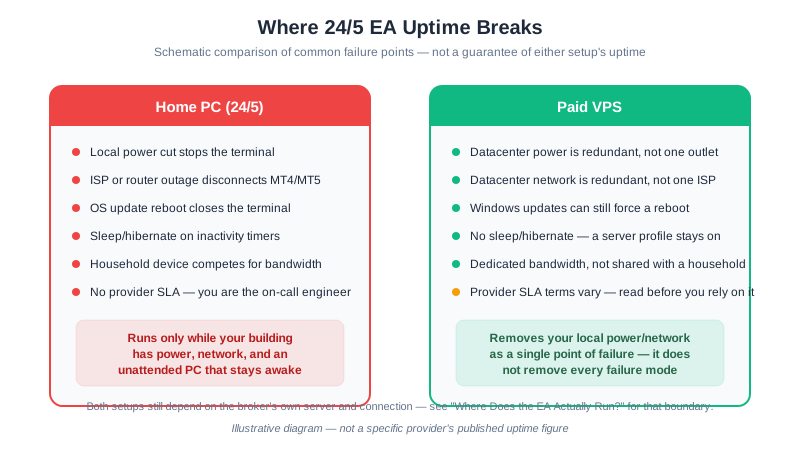
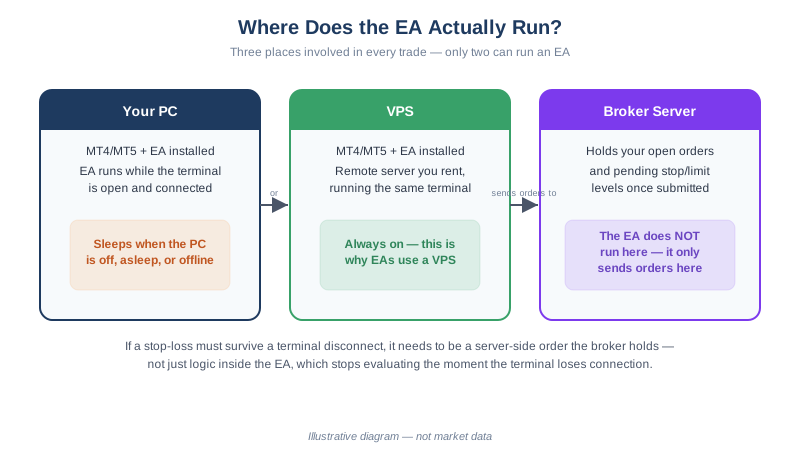
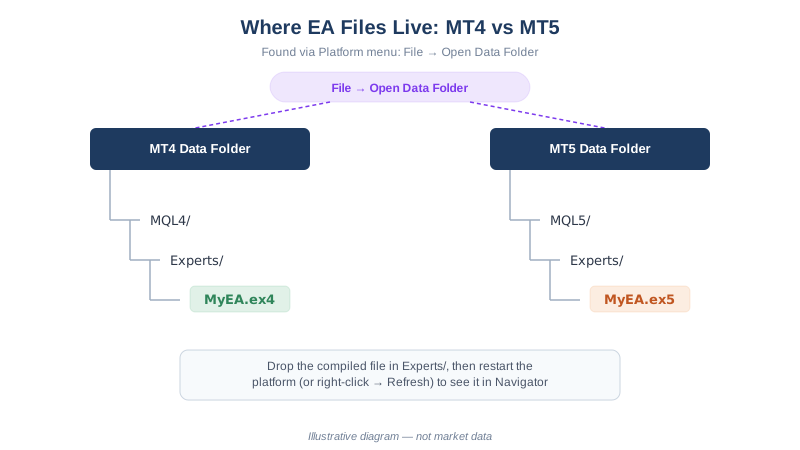
Every price below was checked directly against the provider’s own pricing page in August 2026 and is cited inline. Where a number could not be independently verified — a Windows license add-on fee, a latency claim, a currency conversion — this guide says so instead of printing a figure. If you want the conceptual question of whether you need a VPS at all, and what the free options actually cost in conditions rather than cash, see our VPS for forex EA trading guide first; this page assumes you’ve already decided to pay and want to know where the money goes furthest. If you haven’t decided yet, forex VPS vs home PC puts the plans below against the electricity cost of leaving your own machine running 24/5.
Quick Answer
The cheapest genuinely all-in option here is MQL5’s own VPS at $15.00/month, or $12.80/month effective on a 12-month prepay, with up to 3GB RAM and Windows included, as published by MQL5, August 2026. UltaHost’s Basic Windows VPS is the closest like-for-like comparison at $16.10/month for 2 vCPU and 2GB RAM on a 24-month term, also Windows-included. Contabo’s Cloud VPS 4 (4 vCPU, 8GB RAM) looks cheapest at 5.50 EUR/month for the first 24 months, renewing at 11.40 EUR/month, and Vultr’s vc2-2c-2gb is $15.00/month — but both quote a Linux base price and add Windows Server as a separate line item neither publishes a figure for, so neither headline number is what you would actually pay to run MT4 or MT5. All prices were checked against each provider’s own pricing page or public pricing API in August 2026.
What “Cheapest” Should Actually Mean for MT4/MT5
A headline monthly number is not the full cost. Three things move the real price you pay:
- Whether Windows is included. MT4 and MT5 are Windows applications. A generic Linux cloud VPS quote that looks cheaper than a forex-specific plan often excludes the Windows Server license, which some providers add as a separate, unpublished-rate line item.
- Whether the “intro” price is the renewal price. Several budget providers quote a rate that only applies to a 12- or 24-month prepay, then renew at a higher listed rate. Neither is dishonest on its own, but the two numbers are different, and only one of them is what you’ll actually pay in year two.
- Whether the RAM and CPU clear MetaTrader’s own recommended spec, not just the bare minimum. Our VPS guide lists 2GB RAM and 2 CPU cores as the recommended tier; a plan priced below the options here usually gets there by cutting one of those two numbers.
Verified Prices: 4 Real Plans Compared
| Provider | Plan | Published price | RAM / CPU | Suitable for (guidance, not a promise) |
|---|---|---|---|---|
| MQL5 VPS | MetaTrader VPS | $15.00/mo (1-month); $12.80/mo effective on 12-month prepay ($153/yr) | Up to 3GB RAM / multiple CPU cores (exact core count not published) | One MT4/MT5 terminal running several EAs comfortably; a second full terminal is tight |
| Contabo | Cloud VPS 4 | 5.50 EUR/mo for the first 24 months, renewing at 11.40 EUR/mo standard | 4 vCPU / 8GB RAM / 100GB SSD | 3-5 MT4/MT5 instances by RAM headroom alone, once Windows is added |
| UltaHost | Basic Windows VPS (Forex) | $16.10/mo, billed on a 24-month term | 2 vCPU / 2GB RAM / 50GB NVMe SSD | One terminal at MetaTrader’s recommended spec; Windows is preinstalled |
| Vultr | vc2-2c-2gb Cloud Compute | $15.00/mo base (Linux) + an unpublished per-core Windows license add-on | 2 vCPU / 2GB RAM / 65GB SSD | Same RAM/CPU class as UltaHost’s plan, but the true all-in price is unknown until Windows is priced at checkout |
As published by each provider’s own pricing page or public pricing API, fetched August 2026. Contabo prices are quoted in EUR because that is the currency its page displays; this guide does not convert it to USD, since a converted figure would depend on an exchange rate this guide did not verify.
Provider Notes: What Each Price Actually Buys You
MQL5 VPS is the only option here built into the terminal itself — MT4 and MT5 both have a “VPS” item under Tools that rents this exact service and migrates your running EA to it with a few menu selections. That convenience is real, and so is the tradeoff: at up to 3GB RAM it comfortably covers MetaTrader’s recommended spec, but the exact CPU core count isn’t published, and it’s priced per running terminal rather than per server, which matters if you plan to run MT4 and MT5 side by side.
Contabo’s Cloud VPS 4 has the best specification-per-euro of the four — 4 cores and 8GB RAM, roughly double UltaHost or Vultr at a similar or lower headline price. The catch: it’s a generic Linux cloud box. Contabo’s own VPS page confirms Windows Server is available only as a paid add-on with the license cost “added to the monthly bill,” without stating that cost. Budget for an unknown before treating 5.50 EUR/month as final — and note that rate is the price for a 24-month prepay; Contabo’s standard rate for the same plan is 11.40 EUR/month.
UltaHost’s Basic Windows VPS is marketed specifically as a forex VPS, ships with Windows preinstalled, and at $16.10/month for 2 cores and 2GB RAM is the closest genuine all-in comparison with MQL5’s plan. One inconsistency worth flagging: UltaHost’s page lists this as a “40% off” price billed over 24 months, but the renewal price shown on the same page is identical to the discounted price — unlike Contabo’s clearly different intro-versus-standard rates, it isn’t obvious what, if anything, changes after month 24.
Vultr is a general-purpose cloud provider, not a forex-specific one. Its $15/month vc2-2c-2gb plan (2 vCPU, 2GB RAM, 65GB SSD, verified against Vultr’s own public pricing API) is a Linux price. Vultr’s own support documentation confirms a Windows Server license adds a per-core fee on top but declines to state it as a fixed number, saying it “varies depending on the compute size.” Treat $15/month as a floor, not the cost of a working MT4 install.
One dedicated forex-VPS provider outside the table, Beeks Financial Cloud (beeksfx.com), positions itself on proximity-hosting and latency rather than headline price; its pricing page returned a server error at the time of this check, so no figure for it appears here.
Generic Cloud vs. Dedicated Forex VPS: The Real Tradeoff
The four plans split into two categories. MQL5 VPS and UltaHost are built for MetaTrader specifically — Windows included, MT4/MT5 assumed. Contabo and Vultr are general-purpose cloud compute, cheap and capable enough to run MT4 once you handle the Windows piece yourself.
The reason to pay more for a dedicated forex VPS is proximity hosting: locating the server inside or near the same data center as your broker’s trade server, shortening the round trip an order travels. That matters for scalping and news-event trading, where the edge is measured in milliseconds. None of the four providers here published an independently verifiable latency figure specific enough to quote, so this guide won’t invent one — treat any specific millisecond claim on a marketing page as their claim, not a verified fact. For an EA trading completed H1 bars or higher, this distinction is close to irrelevant, covered in more depth in our VPS guide.
Before signing up for Contabo or Vultr specifically to undercut MQL5 VPS or UltaHost on price, get a written Windows license quote from that provider’s checkout flow or support team first — both confirm the add-on exists, neither publishes the amount, and a $15/month Linux box that becomes a $30/month Windows box is no longer the cheapest line in this table.
Home PC vs. VPS: Why Uptime Is the Real Comparison
Every price in the table above is competing against a $0 option: leaving MT4 or MT5 running on the computer you already own. That comparison is worth making explicit, because the monthly fee only makes sense once you see what it buys.
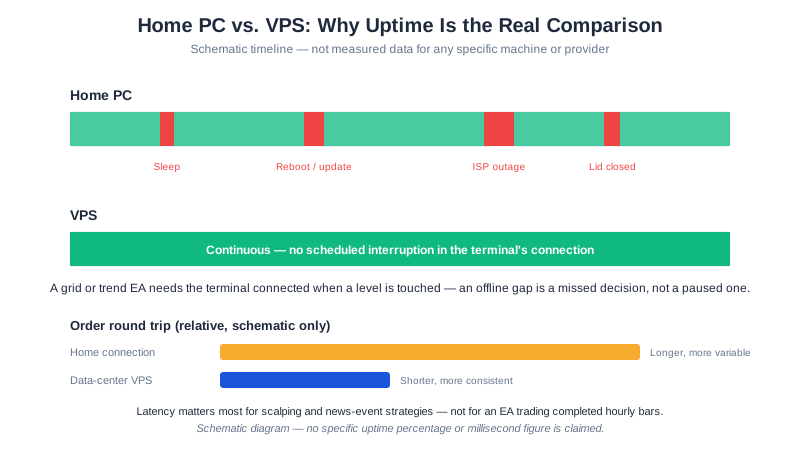
A home PC sleeps, reboots for Windows updates, sits behind a laptop lid that gets closed, and goes offline the moment the household ISP has a bad day — none of which announce themselves in advance. A grid or trend EA that misses a level touch during one of those gaps did not pause; it simply didn’t see the trade. A VPS is a rented machine that stays powered and connected specifically so that stops being a variable. The other advantage — proximity to a broker’s trade server, shortening the round trip an order travels — is the latency point covered above, and it matters far less than uptime for anything slower than scalping.
Which Plan Fits Your Situation
The four verified plans above solve slightly different problems. This maps a situation to the plan most suited to it, without changing any of the published pricing:
| Your situation | Best fit from the table | Why |
|---|---|---|
| Want the simplest setup and no Windows-license shopping | MQL5 VPS | Windows is included in the quoted price and it installs from inside the terminal’s own Tools menu |
| Running several EAs or multiple terminal instances and comfortable configuring Windows yourself | Contabo Cloud VPS 4 | Highest RAM and CPU per euro of the four, once the Windows add-on is priced in |
| Want a forex-branded, single-terminal box with Windows preinstalled | UltaHost Basic Windows VPS | Closest genuine all-in comparison to MQL5 VPS at a similar spec |
| Already run infrastructure on a major cloud provider and want to consolidate | Vultr vc2-2c-2gb | Same RAM/CPU class as UltaHost, but get a firm Windows-license quote before treating the base price as final |
Setting One Up
Once you’ve picked a plan, the process is the same regardless of provider: connect over Remote Desktop, install MT4 or MT5, install your EA, and confirm AutoTrading is enabled after the first login. Our VPS guide covers the specific failure modes worth checking for afterward — scheduled Windows reboots, MT4 not relaunching on boot, and silent disconnects that leave the terminal open but not trading. If you’re setting this up to test an EA for the first time rather than migrating a proven one, do it on a demo login before a funded XM account, so a VPS misconfiguration costs you nothing while you find it.
None of this changes the underlying arithmetic a VPS cannot touch: 75.12% of retail investor accounts lose money trading CFDs with XM, as published by XM in its regulatory risk disclosure, August 2026 — a figure comparable regulated brokers publish in the same range. A VPS buys uptime and, for some strategies, latency. It does not buy an edge, and its monthly cost should be sized to what you can keep paying through a losing month, not to what you hope a winning one will cover.
FAQ
What is the cheapest VPS that can actually run MT4 or MT5 reliably?
MQL5’s own VPS service starts at $15/month ($12.80/month effective on a 12-month prepay), with up to 3GB RAM, which clears MetaTrader’s recommended spec and installs from inside the terminal. Contabo’s Cloud VPS 4 is cheaper on paper at 5.50 EUR/month for 24 months, but that price excludes the Windows license MT4 and MT5 need to run at all.
Do I need Windows for a forex VPS, and does that cost extra?
Yes — MT4 and MT5 are Windows applications. MQL5 VPS and UltaHost’s forex plans include Windows in the quoted price. Contabo and Vultr quote a Linux base price and add Windows separately; both confirm the add-on exists without publishing a flat fee for it.
Is a cheap generic cloud VPS as good as a dedicated forex VPS?
For an EA trading on completed hourly bars or slower, functionally yes, once RAM and Windows are sorted. Dedicated forex VPS providers earn their premium mainly through proximity hosting near broker trade servers, which lowers latency — relevant for scalping and news trading, not for an hourly strategy.
How much RAM does a VPS need to run more than one EA or terminal?
One terminal running several EAs is comfortable on 2GB RAM, the level most plans in this comparison meet. Running two separate terminal installs at once is where 2GB gets tight and 4GB starts to matter.
Continue Your Research
- Do You Need a VPS for Forex EA Trading? — the concept, the free-VPS conditions, and setup/monitoring detail this page doesn’t repeat
- How to Install an EA on MT4 & MT5 — the step after your VPS is running
- MT4 vs MT5 for Expert Advisors — resource use differs between platforms, which affects which plan is enough
- GridMaster Setup Guide — an EA type where uptime, not latency, is the real VPS requirement
This article is for educational purposes only. Trading forex carries significant risk. Full disclaimer