SnapBack EA

Every other trend-following EA in this suite is trying to catch a move already underway. SnapBack bets on the opposite behavior: that price stretched to a statistically rare extreme — beyond 3-standard-deviation Bollinger Bands — tends to snap back toward the mean, and it only takes that bet when RSI independently confirms the move has run out of momentum.
SnapBack is a free mean-reversion Expert Advisor for MetaTrader 4 and MetaTrader 5, one of several distinct types of automated trading algorithms we publish. Because 3-sigma closes are rare by construction, it fires far less often than a trend EA, and each signal is closed out with a single symmetric stop and target rather than a trailing exit.
How It Works
- Extreme detection — The previous bar must close outside the Bollinger Bands set at 3.0 standard deviations (period 16). Closes beyond 3 sigma are rare events, so SnapBack trades selectively rather than constantly
- Exhaustion confirmation — RSI(14) must agree: below 30 for buys at the lower band, above 70 for sells at the upper band
- Symmetric exits — Stop-loss and take-profit are both set at 2.0× ATR(14), so the edge comes from win rate (about 60% in backtests), not from asymmetric targets
- One trade at a time — SnapBack never stacks positions or averages into a loser; each signal is an independent, fully-stopped trade
Key Features
| Feature | Details |
|---|---|
| Strategy | Bollinger Band + RSI mean reversion |
| Timeframe | H1 (recommended) |
| Pairs | EURUSD, GBPUSD (best), USDJPY |
| Indicators | Bollinger Bands (16, 3.0), RSI (14), ATR (14) |
| Risk per trade | 2% (configurable) |
| Stop-loss | 2.0× ATR (dynamic) |
| Take-profit | 2.0× ATR (1:1 R:R, win-rate driven) |
| Max positions | 1 (no stacking, no martingale) |
| Platform | MetaTrader 4 and MetaTrader 5 |
| Price | Free |
Backtest Results (2024-01 → 2026-03, H1)
| Pair | Trades | Profit Factor | Win Rate | Max Drawdown | Net Return |
|---|---|---|---|---|---|
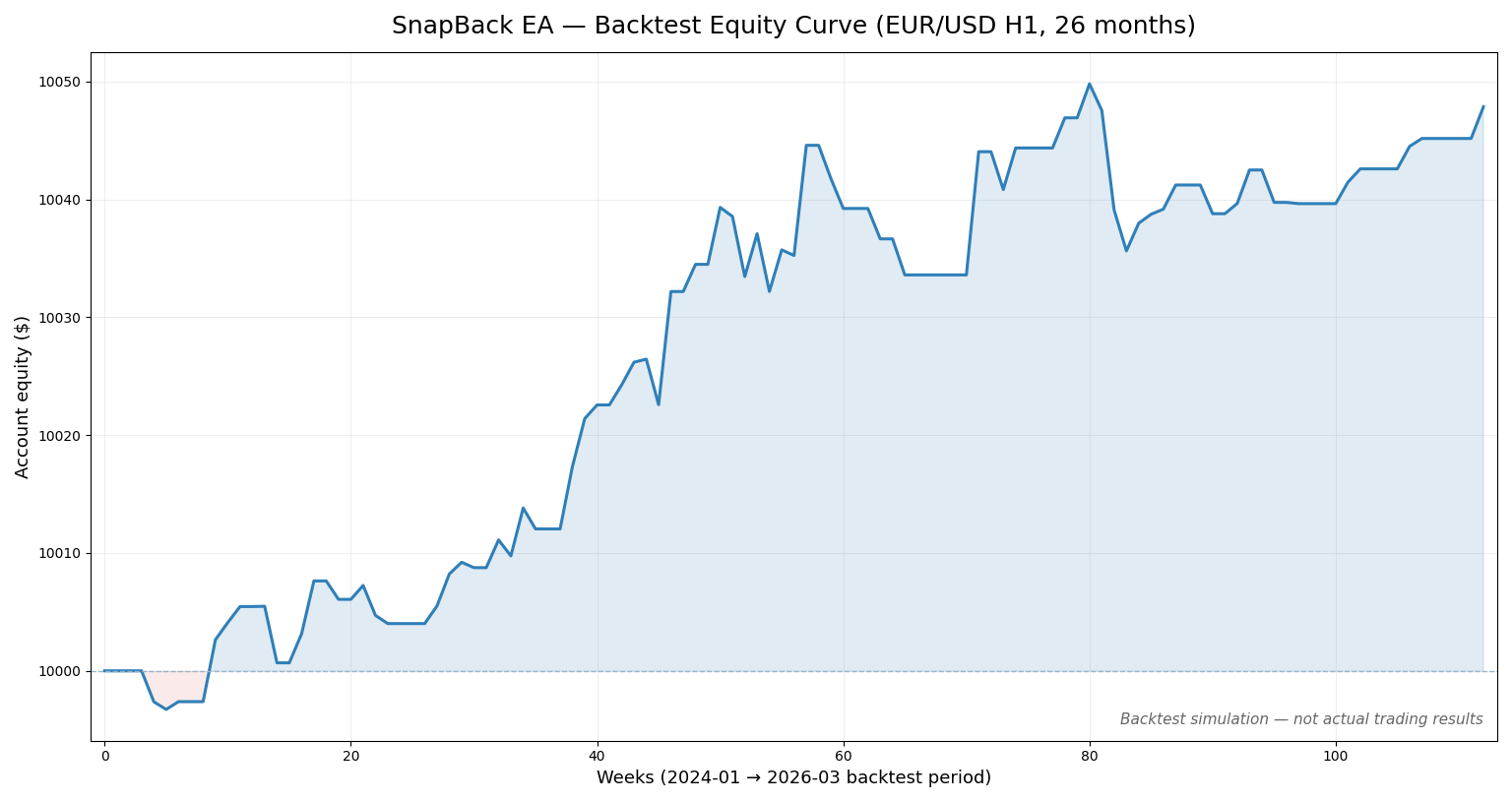
| EURUSD | 79 | 1.65 | 62.0% | 0.2% | +0.46% |
| GBPUSD | 78 | 1.57 | 61.5% | 0.1% | +0.40% |
| USDJPY | 57 | 0.58 — did not pass | 33.3% | 0.5% | −0.43% |
Backtests use bid-candle data with spread modelled. USDJPY loses money over the window and does not pass our internal quality gate, so we recommend running SnapBack on EURUSD and GBPUSD. Past performance is not indicative of future results.
Net return is the change in the test account’s balance over the whole window, on the $10,000 it started with. It is a fraction of a percent for the same reason the drawdown is: the harness commits about 10% of the account’s free equity per trade with no leverage on top, so return and drawdown scale together — why the figures look small.
Figures corrected July 30, 2026. These numbers replace an earlier set produced by a backtest engine that was decoding intrabar highs and lows in the wrong order. SnapBack still clears our quality gate on both pairs, but GBPUSD is weaker than the figure we previously showed (profit factor 1.94 → 1.57). Full disclosure on the performance page.
Risk Controls (Built In)
These settings limit how much a single configuration can lose; they do not make automated trading safe.
- Hard stop on every trade — 2.0× ATR stop-loss placed at order entry, never widened
- No averaging / no martingale — Maximum 1 open position; a loss is taken, never doubled down
- 3-sigma entry filter — Trades only statistically extreme dislocations, avoiding chop
- Daily trade limit — Max 5 entries per day
- Automatic lot sizing — Position size derived from account balance × risk %
Best For
- Traders who want a counter-trend complement to trend-following EAs
- Quiet-to-normal volatility regimes where ranges dominate
- Accounts with $500+ balance
- H1 charts on EURUSD or GBPUSD
Recommended Settings
- Risk percent: 2% (default), 1% for sub-$500 accounts
- BB period / deviation: 16 / 3.0 (defaults, as backtested)
- RSI period / levels: 14, 30/70
- SL / TP multipliers: 2.0× / 2.0× ATR
- Pairs: EURUSD, GBPUSD
- VPS: Recommended for uninterrupted operation
Getting Started
- Open a free XM account if you don’t have one
- Fund it with $200 or more — the minimum the EAs are designed for (deposit walkthrough)
- Register your account to activate the EA
- Download SnapBack EA (both MT4 .ex4 and MT5 .ex5 are provided)
- Install on MetaTrader following our step-by-step guide
- Attach to an H1 chart of EURUSD or GBPUSD and confirm “AutoTrading” is enabled
Frequently Asked Questions
How is SnapBack different from GridMaster? Both like ranging markets, but GridMaster places a lattice of orders and manages them as a basket, while SnapBack takes a single, fully-stopped trade only at statistical extremes. SnapBack’s risk per signal is fixed and known in advance.
Why does SnapBack trade so rarely? Closes outside 3-sigma bands are uncommon by construction — roughly 1–2 signals per week per pair on H1. That selectivity is where the edge comes from; widening the bands’ deviation lower would add trades but degrade quality.
Will SnapBack fight my trend EAs if they share an account? It can trade opposite to a trend EA on the same pair — SnapBack fades the extremes a trend system may be riding. Orders never get mixed up (SnapBack tags its trades with magic number 77101), but offsetting positions tie up margin on both sides. Either run it on a pair your trend EAs aren’t holding, or accept the occasional hedged exposure knowingly.
Does it work on USDJPY? It runs on any pair, but our 26-month backtest showed the edge concentrated in EURUSD and GBPUSD. We publish this openly rather than overstate coverage — see the backtest table above.
Further Reading
- Technical Analysis Basics — BB, RSI, and ATR fundamentals
- How to Install an EA on MetaTrader — step-by-step setup
- How to Backtest a Forex EA — validate settings before going live
- Forex Risk Management Guide — essential risk management
- VPS for Forex Trading — keep the EA running 24/7
Mean-reversion trading involves significant risk — extended moves can continue further than expected. Past performance is not indicative of future results. Please read our risk disclosure before trading.